Work with QuickBooks day to day
Once posting is on, the day-to-day goal is that nobody types a Florio sale into QuickBooks again. This page is what your accounting team needs to know about the new normal: what posts on its own, how to recognize a Florio-posted document, and what still needs a person.
What posts automatically
| When this happens in Florio | What appears in QuickBooks |
|---|---|
| An order reaches a status you ticked (usually delivered or picked up) | An invoice, or a sales receipt when it was already paid in full |
| A proposal is accepted (with event staging on) | The event’s estimate, its deposit invoices, and its final invoice, built from the payment schedule |
| An event deposit comes due (signed on or after the cutover date) | The deposit invoice is billed |
| A plant-care billing month is closed (with month-end posting on) | One consolidated invoice: the flat fee plus replacements |
| A card payment succeeds | A payment on the matching invoice, in the clearing account, with the processing fee booked to the fee account |
| A card payment is refunded | A refund receipt against the right account |
Event documents are staged for your bookkeeper to review and send rather than sent to the client automatically, so a person stays in the loop on event billing.
How to recognize a Florio document
Every document Florio posts uses the record’s own Florio number as the QuickBooks document number: order OR-26-000327 becomes invoice number OR-26-000327. An event billed in milestones adds the milestone’s position, so a deposit invoice on EV-26-004914 posts as EV-26-004914-1 and the balance as EV-26-004914-2. The memo carries the Florio reference too. That one convention is what makes everything reconcile: you can go from any document in QuickBooks to the record behind it by searching the number in Florio, and Florio recognizes its own documents and never posts the same one twice.
If you mapped a custom field during setup, Florio stamps it on the documents it posts, and you can add that column to your own QuickBooks reports. On orders it carries the order number; on events it carries the event’s source reference from the system the event came in on, when there is one.
See What Florio numbers mean for how the numbers read.
What the client sees on the invoice
Several things on a posted invoice are written for the client rather than for your books. You set them on the Invoice presentation card, under Admin, then QuickBooks, next to Invoicing options. The card opens on the settings your invoices already use. Every change asks you to confirm before it saves and is recorded with who made it, and it reaches the invoices Florio creates from then on, never one already in QuickBooks.
How each billing line reads. Payment line wording sets the description on each line of a deposit, progress or final invoice. Name the payment (Deposit, Retainage) makes the line read as the milestone it bills, such as Deposit, Upon Commencement or Retainage. Deposits Received is the name of the account the money posts to. It reads to a client as though you were acknowledging money received when the invoice is asking for it, and it stays available for companies that already rely on it. Leave it blank (item name only) prints no description at all.
Payments that cover taxable and non-taxable work. Such a payment posts as two lines, because QuickBooks works out tax line by line. With Label taxable and non-taxable portions on, they read Deposit (taxable portion) and Deposit (non-taxable portion), so they never look like a duplicate. The switch appears once the lines name the payment, since the other two wordings have nothing to label. Read the caution at the end of this section before you rely on it.
The Note to customer. Under Note to customer, choose which invoices Florio writes one on:
- Deposit and progress invoices: the note names the payment and its share of the contract, for example “Deposit · 20% of contract total”.
- Final invoices: the note sets out the contract total, what was invoiced before, and this invoice. Where Florio cannot account for the whole contract, such as a project partly billed before it moved to Florio, the note names the payment and leaves the arithmetic out rather than guess at it.
- Service call invoices: the note is what you write when you bill the call, described next.
Where Florio writes a note, QuickBooks does not add your company’s default customer message to that invoice. If you keep standing text there, such as your remit-to address, it will not print on an invoice that carries a Florio note.
On a service invoice, the note is what you write. With Service call invoices on, the QuickBooks billing dialog you bill a service call from has a Message to the client field, printed as the Note to customer. It starts from what you saved last time, or, if there is nothing, from the call’s internal notes as a draft. Internal notes are written for your team, so Post to QuickBooks stays unavailable while the draft is untouched: edit it for the client, or clear it to print no note.
Labor hours. Florio never sends QuickBooks an hourly rate, so the hours beside a labor amount are the only way a client can work one out. Turn off Show labor hours on service invoices and each labor line posts its amount with no quantity. Parts keep their quantities, and no amount changes.
What the labor line says. Labor line on service invoices sets the line’s wording. Labor is the plain caption. Name the days worked prints the days the work was done instead, such as “Service performed September 18”. Two or three days in one month read “September 3, 5 and 18”, days across two months read “August 29 and September 2”, and four or more read as a range, “September 3 to 21”. Only the days whose hours this invoice bills are named, oldest first: bill August’s hours and hold September’s, and the next invoice names the September days. A day split between two invoices appears on both. With labor hours left off, the client sees when you worked without being able to work out your rate.
The card surcharge, when you charge one. Florio adds it as its own line, followed by a note giving the balance due if they pay by ACH, wire or check instead. That figure is worked out from the invoice total at the moment it posts, so it cannot drift away from the fee above it. The fee carries the same class as the rest of the document, so a class-based profit and loss puts it in the right column, and it is never itself taxed.
The surcharge goes on event billing and service calls alike, never on orders or plant care. It is off until you switch it on, and the percentage, the note’s wording and the item the fee posts to live in Invoicing options, the card beside Invoice presentation.
Whether the invoice can be paid online. Under Online payment, set Bank transfer (ACH) and Card separately for the event and service call invoices Florio creates. QuickBooks default leaves your company’s own setting in charge, which is worth checking: if that default is off, an invoice can reach a client with no way to pay it, which is easy to miss on a deposit you want paid quickly. On offers the method on every one of those invoices, and Off withholds it even where QuickBooks would have offered it.
Stop hand-entering Florio sales
This is the one habit that has to change at go-live, and it is worth saying plainly: from the cutover date, do not hand-enter invoices for Florio orders or events. Florio posts them itself, and a hand-entered copy is a duplicate that overstates income until someone finds it.
If you genuinely must hand-enter a document (a one-off correction, an edge case Florio does not cover yet), put the event or order number in the line description or in the memo. Florio reads both, and on the next sync it links the document to that record. For an order, Florio then treats it as billed and will not post a competing copy of its own.
Three things worth knowing about that match:
- It works with old numbers too. A pre-renumber number in a memo still finds its record, so historical documents and anything filed by hand before the change keep matching.
- It only recognises events and orders. A plant-care contract, standing order or service number in a memo is not matched: attach those documents to their record from the unmatched queue below instead.
- The first number found wins. If a memo quotes two different Florio numbers, Florio links to the first one and does not ask. Keep one record per hand-entered document.
You can turn the behaviour off under Admin, then QuickBooks, with Match Florio numbers in memos on the Connection card. Leave it on unless you have a reason not to.
Watch a record’s QuickBooks panel
Each order, event, and plant-care billing month shows its own QuickBooks state on its record: what was posted, the document number, the payments against it, and the balance. An event’s panel lists every milestone invoice with its status, due date, and what has been collected.
 Screenshot from a demo workspace; data illustrative.
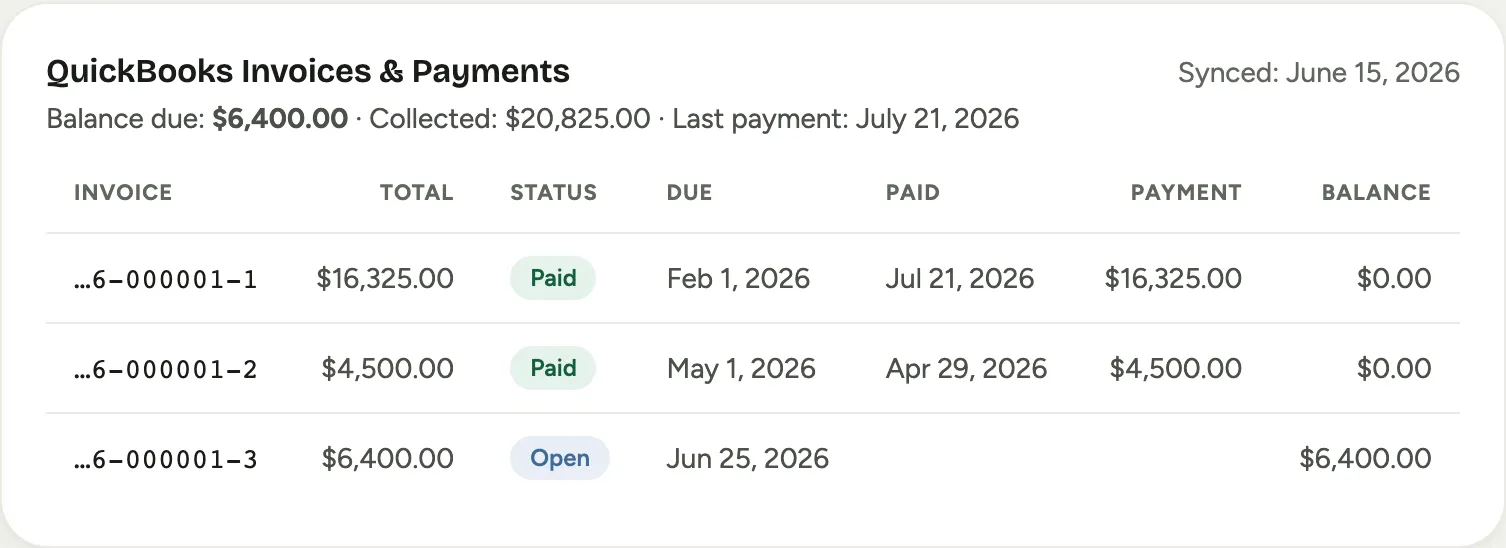 Screenshot from a demo workspace; data illustrative.
The record’s activity feed logs each post as it happens (“Pushed to QuickBooks”, with the document), and logs failures just as visibly, so the paper trail lives with the record.
The hourly sync, both directions
Florio re-reads QuickBooks on a schedule (hourly unless you changed it), so work done directly in your books flows back: a payment your bookkeeper records by hand shows on the Florio record within the hour, balances stay current, and the Cash / Receivables report keeps reconciling with your QuickBooks aging. You never need to sync by hand, but the Sync invoices & payments button on the QuickBooks tab pulls immediately when you are mid-conversation with a client and want the freshest number.
The review queues
Two small queues on the QuickBooks tab catch what automation refuses to guess about. Both are empty most days, and both appear only when they have contents:
-
Unmatched invoices: a QuickBooks invoice that references a record Florio cannot find, usually a typo in a hand-entered number or an event that was never imported. Attribute it to the right event (Florio then pulls its payments in too) or dismiss it as not Florio’s business.
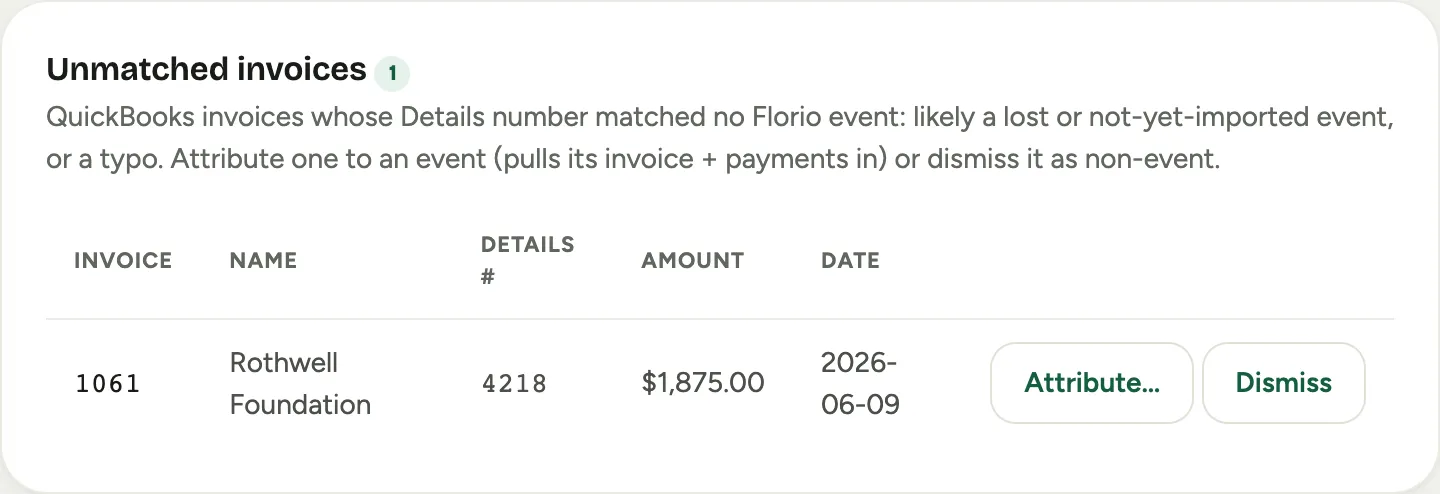 Screenshot from a demo workspace; data illustrative.
 -
Match review: a document whose two identifying clues disagree with each other. Florio shows both readings; you pick the right one or dismiss it.
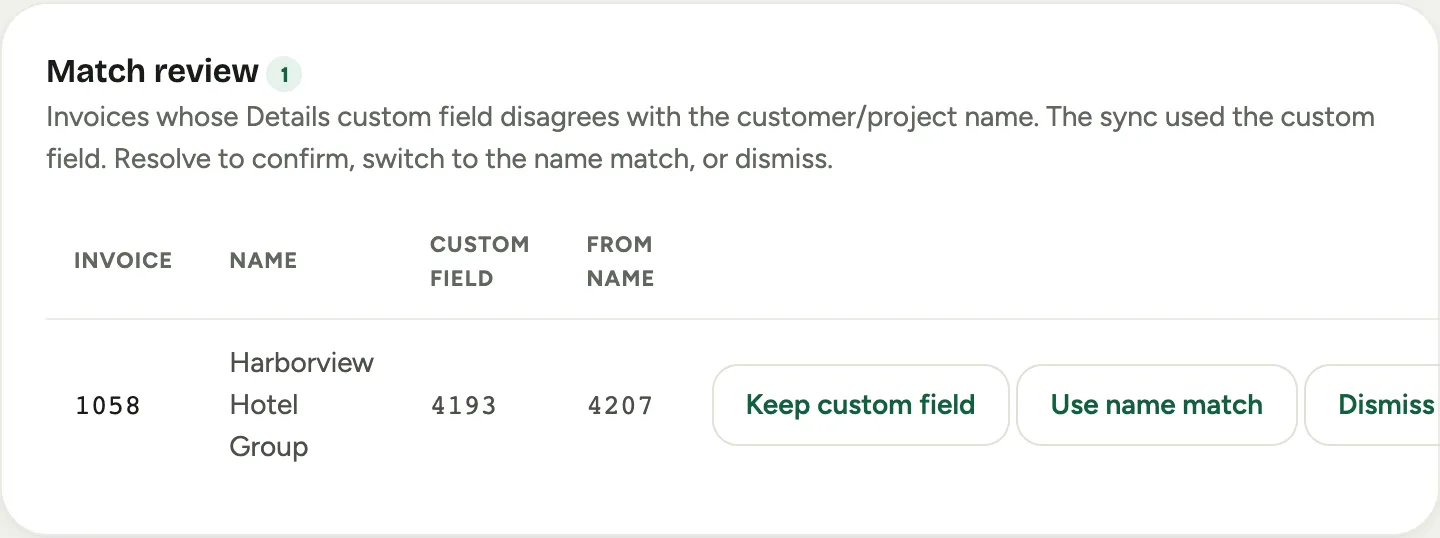 Screenshot from a demo workspace; data illustrative.
A minute on these queues when they light up keeps the two systems agreeing to the penny.
Good to know
- Edits after posting happen in QuickBooks. Once an order’s document is posted, price corrections and adjustments on that document are made in QuickBooks, the same as any other document your bookkeeper maintains. Event documents are the exception: revise the event in Florio and it reconciles its own staged documents, never touching an invoice that has been paid.
- Statements work as always. Because everything posts to your real customers (with events as jobs beneath them), your statement and collections workflow in QuickBooks does not change at all.