Build a proposal from sections and lines
A proposal reads best as a story: the ceremony, then the reception, then the rentals. You build that structure with sections and lines, pulling items and their costs from your catalog so the numbers are right from the start and the margin checks itself as you work.
Before you start
- Your price book should hold the items you sell, entered at cost, so lines carry a real cost the scorecard can use.
- Set a target margin so the Live scorecard on the rail has something to check the price against.
Steps
-
Open the event and open its proposal. Click + Add section and name it, for example Ceremony or Reception.
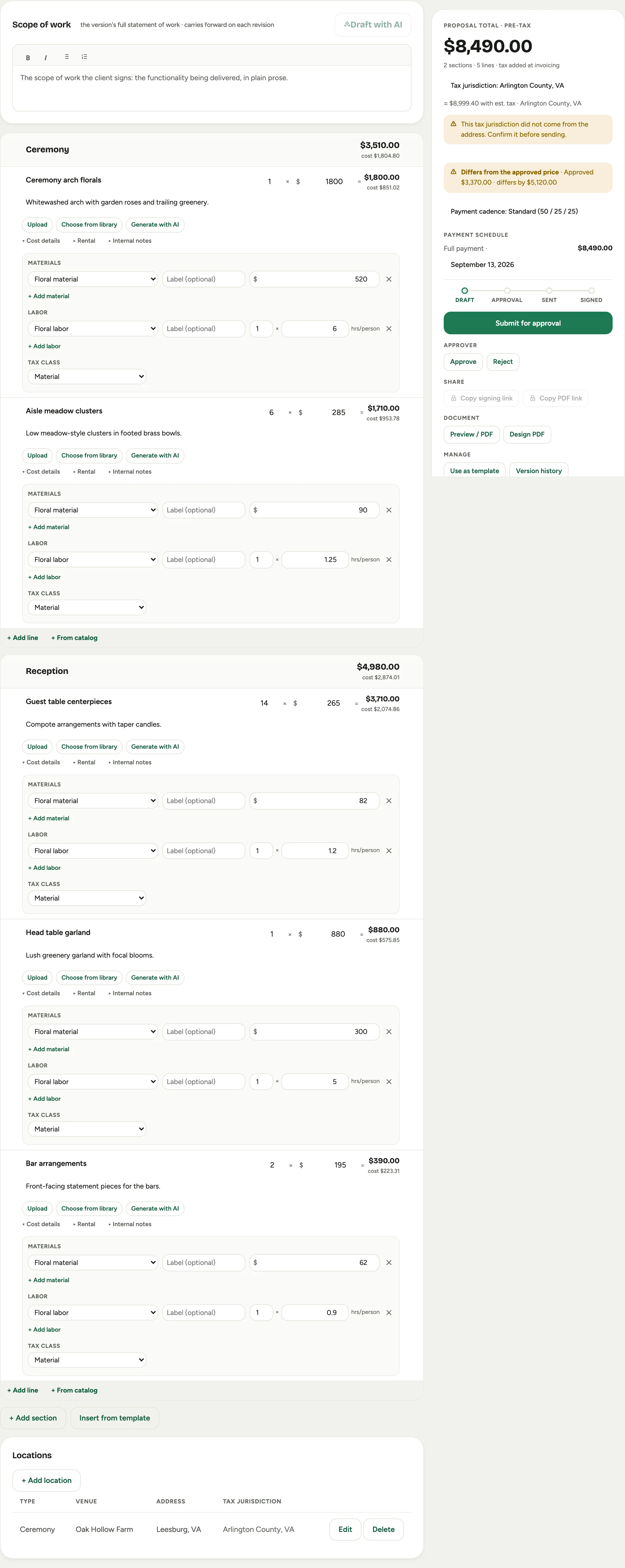 Screenshot from a demo workspace; data illustrative.
 -
Add items. + Add line creates a blank line; + From catalog pulls one from your price book with its cost already attached. Give each an Item name, a quantity, and a unit price, and write the Description the customer will read.
-
Add photos of your own past work: Choose from library searches your uploaded work by what is in the picture (“blush centerpieces in gold vessels”), Upload adds a new one, and Generate with AI creates a placeholder look.
A line you picked from the catalog before its part had pictures shows The part’s pictures (3) beside those buttons, the number being how many of the part’s pictures the line does not carry yet. It opens the part’s pictures under the line, every one chosen; click a picture to leave it out, and one already on the line says On this line. Add 3 pictures copies them onto the line after its own pictures. The line’s name, description, price and costs stay as they are, and the event’s activity notes what was added. Delete a picture from the line and it is offered again.
-
Open Cost details on a line to record its Materials and Labor costs. This is what feeds the scorecard, so the margin on the rail is real, not a guess. Every cost you enter needs a Cost category, which is how the scorecard knows what kind of cost it is. New rows start on your usual category, so most of the time there is nothing to change.
-
Reorder freely. Use the Drag to reorder handle to move a line up or down, or drag it into a different section. Sections drag the same way. On a long proposal, fold the sections first: click the chevron beside a section’s name to fold it to its heading row, or Collapse all above the sections to fold every one (it reads Expand all once they all are). A folded stack is short, so a section lands where you drop it; the section menu also has Move up and Move down for a single step. Folding is your own view, remembered for each proposal, and never changes the client’s document.
-
Watch the Live scorecard on the rail as you build. On target means the price clears your margin; Check the flags below means a choice pushed it under, and you can adjust before anyone sees it.
Good to know
- Optional lines. Mark a line Optional to show it to the client without counting it in the total, useful for an upgrade they can add.
- Internal notes never show. The Internal notes on a line are for your team and never appear on the client’s copy.
- A cost without a category is flagged, not swallowed. If a cost row is left without a category, Florio marks it on the line, warns above the live scorecard, and holds the proposal back at Submit until you set one. A cost the scorecard cannot place is a margin that reads better than the job really is, so it is worth the extra click.
- From a consult. If you recorded the discovery meeting, Florio can turn the transcript into a draft proposal with lines to refine. It is a head start, not an autopilot.
- Next: check the price in The margin scorecard, then send it for signature.
- Where this fits: Proposals.