Set up Projects
Projects needs very little setup, because it reuses what the rest of Florio already has: the event, the proposal, the schedule and the punch clock. What remains is one Admin card, a module switch, two tolerances, and a handful of permissions that decide who plans cost, who ships it, who sees the money and who approves.
Before you start
Everything on this page needs the permission to manage roles and settings, which the admin role holds.
Admin, then Recognition
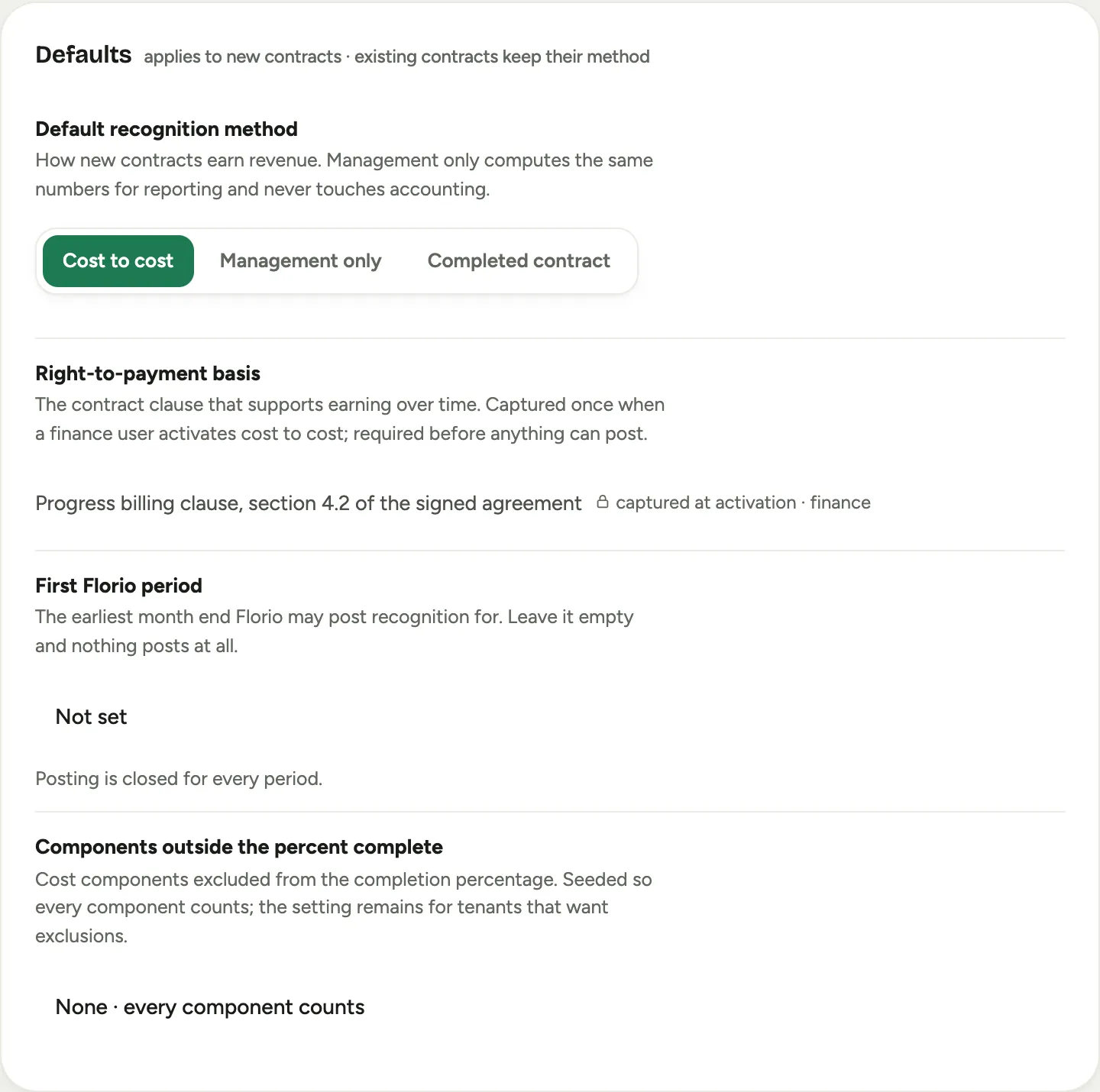 Screenshot from a demo workspace; data illustrative.
The Defaults card applies to new contracts; existing contracts keep their method.
- Default recognition method is how new contracts earn revenue. Management only computes the same numbers for reporting and never touches accounting; it is the right choice for a studio that bills deposits and finals and keeps its books on invoices. Cost to cost earns revenue as cost is incurred and takes part in the monthly recognition close; choose it with your accountant. Completed contract is listed for completeness. The picker saves as soon as you click.
- Right-to-payment basis is the contract clause that supports earning revenue over time. It is captured once, the first time a finance user activates a cost-to-cost contract with it, and shown here read-only; until then the row reads Not captured yet. A cost-to-cost contract created before the basis is on file lands as a Draft and cannot be activated until the basis is recorded, so have it ready before you switch the default.
- Components outside the percent complete are cost components excluded from the completion percentage. Florio seeds this empty so every component counts; leave it that way unless your accountant asks for an exclusion.
Automatic posting
- Post recognition automatically is off at first: posting is manual from the recognition close. On, a scheduled job posts every run whose guard passes; a failing run is skipped with an alert to the people you list, never posted.
- Frequency is Nightly, Weekly or Monthly. The release and labor absorption can post at any cadence; the gross-up and loss entries post only with the month-end run.
- Hours approved after a month posts reads Always on: they post as a top-up dated to that month while it is open, and land in the next open month once it is locked.
Service labor
For a company that runs service calls, this card moves the time your W2 technicians spend on service calls out of wages and into cost, in the month it is worked, at each person’s loaded rate. Subcontractor time stays out: their bills already carry it.
- Move service-call labor into cost of goods sold turns it on. It posts with the recognition post and on the same schedule.
- Start date: hours worked before this date are left out, for when your previous system already absorbed them.
- Cost account is the debit side. Left alone it reads Same as projects’ direct labor and follows that mapping.
- Class comes from your service billing settings and is shown read-only.
Account mapping
Each mapping picks an account from your connected QuickBooks company, and nothing posts while a required one is empty. Two of them carry labor:
- Labor contra account is the offset when approved hours move into project and service cost, keeping payroll whole. Labor posts as two lines on it: wages and burden.
- Burden offset account is where the burden line posts. It reads Same as labor contra until your accountant wants burden on its own account.
- Wages account is the gross wages account the labor sanity check reads: the wages absorbed, burden left out, may never exceed the payroll posted.
Turn materials on
Materials, phases, pick lists and My projects are one module switch, off for a new workspace. It is part of your workspace configuration rather than a screen; ask your Florio contact to turn it on, and the Materials card, the phase strip and the sidebar entry appear on the next sign-in. Contracts, change orders, the Live profit panel and the Project status report do not depend on it.
Two workspace values travel with it:
- The default Costing a new materials line takes when nobody picks one: On the vendor bill for a studio that buys per job, or From our stock for one that carries inventory.
- The cost category a stock shipment lands in when its line has no catalog item to say. Without it, an uncatalogued shipment records its quantity and contributes nothing to cost, so set it.
Tolerances for planned cost
Two values decide when planned materials need an approval: a dollar amount and a percent of the approved projected cost, $500 and 1% as seeded. A project’s unapproved total must sit inside both to be treated as covered; see Approve planned cost. They are workspace configuration, not a screen; the contract card names the values in force whenever it reports an amount as tolerated.
Permissions
Under Admin, then Roles, the Projects permissions are:
- View contracts & change orders: see the contract card. Designers, managers and finance have it.
- Manage contracts & author change orders: start a change order, enter a re-estimate, apply an internal change order, change a contract’s status. Managers and finance.
- Approve contract revisions: approve a re-estimate or a raised planned-cost draft. Finance and managers; keep it away from the people who raise them when you can.
- View live profit & project status: the Live profit panel, the Project status report, the recognition close, and every dollar figure on the materials card, the pick list and My projects. Managers and finance, and the view-all role.
materials.plan: add, edit and remove materials lines and raise a re-estimate. Seeded to everyone who can edit an event, so that it can be taken away from someone rather than handed out one by one.materials.ship: stage a day, take items off, and confirm a load from the pick list. Held by the Warehouse role, which deliberately cannot edit events or see project money: a staging hand sees what to load, never what it cost.- Post revenue recognition: post runs, top-ups and service labor from the recognition close, and lock the month. Finance holds it.
Phases and pick-list reading follow the scheduling permissions, and the change-order review’s cost half follows the scorecard’s cost permission, so a salesperson who cannot see costs sees the review without its cost impact.
Good to know
- The Materials switch gates the module for everyone; the permissions gate what each person can do inside it.
- A person who only holds the ship permission can still open a pick list from its link, which is how a phone in the warehouse reaches it.