Register your own networks
Florio counts how often a client opens a proposal. Your own team opens those same links: checking a proposal before it goes out, showing it on a laptop at the studio, opening the client’s copy to answer a question. Left alone, all of that reads as client interest.
Registering the addresses your studio browses from fixes it. Visits from those addresses are labelled with the network’s name wherever they appear, and they stop counting toward client engagement.
Before you start
- You need permission to manage settings.
- You need the public address your office uses. Your internet provider can tell you, or search the web for “what is my IP” from a computer at the studio. It is not the address on your router or laptop, which usually starts with 192.168 or 10.
Steps
- Go to Admin, then Networks.
- Choose Add network.
- Give it a Name you will recognise later, like “Main office” or “Warehouse”. This name is what shows on every visit from that range, so make it read well in a sentence.
- Enter the Addresses. Three shapes are accepted and all mean the same thing to Florio: one address, a range written with a dash between two addresses, or a block in slash notation. The hint under the field shows one of each.
- Pick a Type: Office, Warehouse, VPN, Remote, or Other. This is for your own sorting and does not change the behaviour.
- Add a Note if it helps the next person, then save. It takes effect immediately, including on everything already recorded.
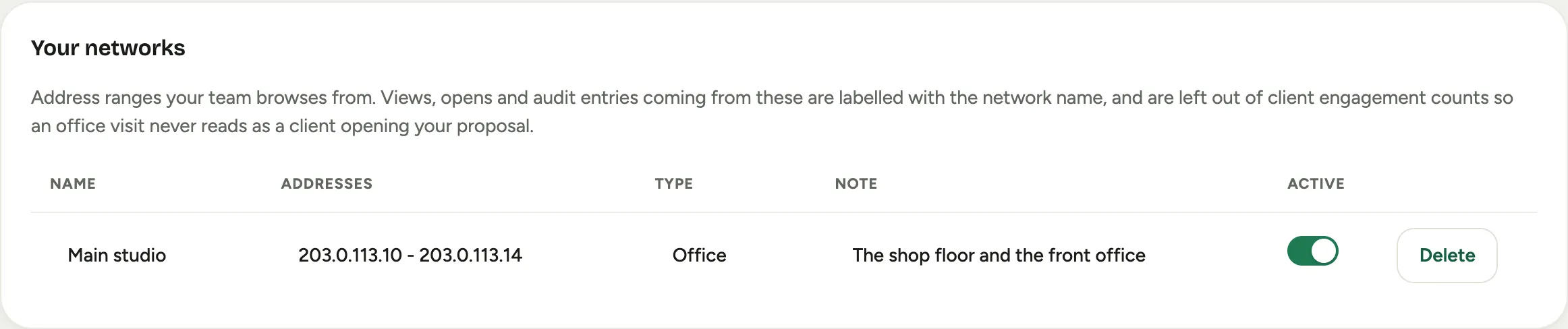 Screenshot from a demo workspace; data illustrative.
Good to know
- It applies backwards as well as forwards. Registering a range today corrects every view Florio has already recorded from it. You do not need to reprocess anything, and nothing is rewritten: the visits are simply read differently from then on. The same is true in reverse, so removing a range makes those visits count as client views again. Florio says so when you remove one.
- A range that is too wide is refused. Florio will not accept a range covering more than 65,536 addresses. A typo in a range is silent and expensive: it would label genuine client visits as internal and quietly drop them from your counts.
- The most specific name wins. If you register one address for a single desk and also the whole office block that contains it, a visit from that desk shows the desk’s name.
- Home internet moves. Most home and mobile connections get a new address periodically, so registering a team member’s home address works until it changes. For one-off cases, it is easier to mark the visit itself with This was us on the proposal. See see who opened your proposal.
- Turning one off, rather than deleting it. Set it inactive and it stops labelling and stops discounting, but the entry stays for when you need it again.
- It can allow PIN sign-in. Switch on Allow PIN Sign-in for a network so your crew can sign in on shared devices there. See sign in with a PIN on shared devices.
- It also labels the activity log. Admin entries made from a registered range carry the same name, which makes an audit read much faster. See read the activity log.