Run the recognition close
On a workspace that recognizes revenue cost to cost, revenue on a project is earned as the work is done, not when the deposit lands. The Recognition close screen is where finance sees that computed month by month and posts it to accounting: one period per month, one run per contract inside it, and a guard report on every run that says whether the numbers reconcile. Period close is not project close: every active contract gets a run every month, computed together, and a project’s own closeout is the separate gate on the project itself.
Before you start
The screen is for people who can see project money; posting needs the Post revenue recognition permission. It matters on a cost-to-cost workspace: a management-only workspace sees the same computed figures on its Live profit panels, but nothing ever moves to accounting for it. Posting also needs your accounting connection’s writes turned on and every account mapped in Admin, then Recognition; until then the post buttons stay off and say why.
The page
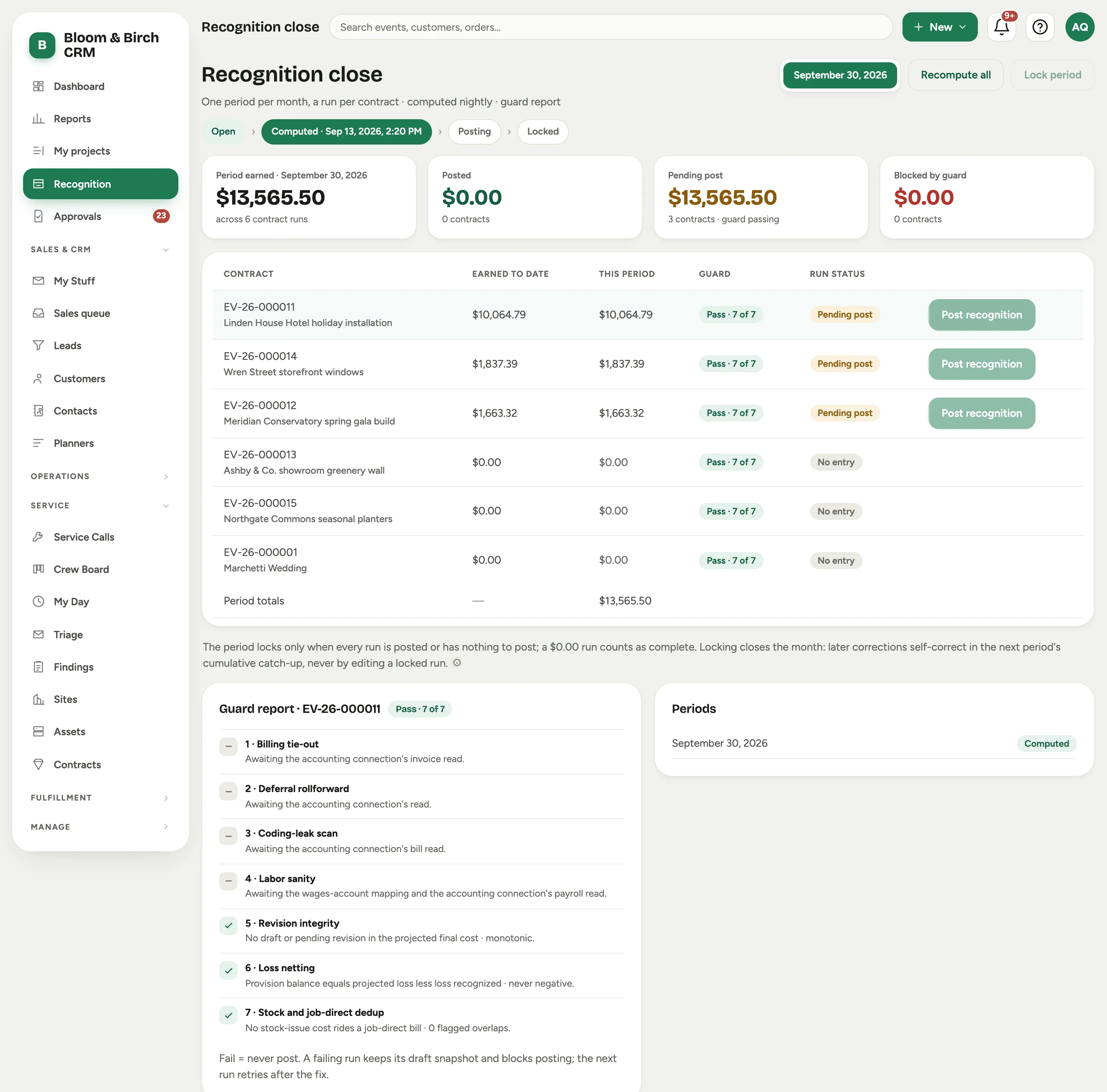 Screenshot from a demo workspace; data illustrative.
- The period picker at the top lists recent months; the selected one drives the page. The Periods card at the bottom right lists them with their state.
- The stepper reads Open, Computed (with the time of the last compute), Posting (with how many runs have posted) and Locked. A period reaches Computed on its own every night.
- The four stats: the period’s earned total across the contract runs and any top-ups, Posted, Pending post (runs whose guard passes) and Blocked by guard.
- The run table has one row per active contract: Earned to date, This period, the Guard result, and the Run status: Pending post when the run earned something this period, No entry when it earned nothing, Blocked when the guard failed, then Posting and Posted once you post it. A contract on hold carries an On hold chip. The footer is the Period totals.
Post a run
- Select a row. Its guard report and a preview of the entries open beside the table.
- Read the preview. It is a computation only: nothing reaches accounting until you post.
- Select Post to accounting in the preview, or Post recognition on the row.
The preview groups the entries the post makes:
- Recognition release, which moves this period’s earned revenue out of deferred revenue into revenue, by bucket.
- Underbilling gross-up, at month end only, when you have earned more than you have billed. It reverses on the first of the next month.
- Labor absorption, which moves the approved hours on the project out of wages and into the project’s direct labor cost, at each person’s loaded rate. It credits two lines: one for the wages and one for the burden (payroll taxes, time off, insurance and benefits), so your accountant can see each part. Both lines go to the labor contra account, unless you map a separate Burden offset account.
- Loss provision, at month end only, when a project is projected to lose money.
The release and labor absorption can post at any cadence; the gross-up and the loss provision post only with the month-end run. View entries on a posted row lists what it posted.
Hours approved after a month posted
Approvals do not always land before the month posts. When hours worked in a month that has already posted get approved later, Florio adds a top-up under that contract: a new run for the same month that carries only what changed, dated the month’s last day so the cost lands in the month it was worked. The first is top-up B, then C, and so on. Each row says how many hours it carries and when the month posted.
- Select Post top-up on the row to post it, the same way as a run.
- Every post handles the oldest open month first. Posting a later month posts any earlier month’s top-ups before it, so a late hour never lands in two months.
- Florio refreshes top-ups every night and when you select Recompute all. A top-up with nothing to post is never kept.
Service labor
If your company runs service calls, the Service labor card moves the time your W2 technicians spend on service calls out of wages and into your direct labor cost, in the month the hours were worked, at each person’s loaded rate. It lists the month’s calls with their Hours, Wages, Burden and Total.
- Every billing class counts, including warranty and no-charge calls, because the hours were worked whether or not the call bills.
- Subcontractor time is not here: their bills already carry it.
- Closing or invoicing a call never moves its labor. The cost follows the hours worked and approved.
- Select Post service labor to post the month. The Post service labor preview shows each call’s lines: the debit to the cost account and the wages and burden credits, every line tagged with the call’s customer and your service class.
- Hours approved after the month posted appear as top-up rows under the calls, with Post top-up, the same rules as a contract’s top-ups.
- A technician with hours and no pay rate holds the post and the card names the calls, so nothing ever posts at zero.
Turn service labor on, and choose its start date and cost account, in Admin, then Recognition.
Lock the month
Select Lock period once every run, top-up and the service labor entry is posted or has nothing to post; until then the button stays off and says why. While a month is posted and not locked, the Periods card says it is open for top-ups until locked. Locking ends top-ups: hours approved later for that month land in the next open month instead.
The guard report
Select a row to read its guard report. The page opens on the first failing run if there is one. Seven checks, each with a plain sentence for its result:
- Billing tie-out: the invoices on the deferral line equal the milestone ledger.
- Deferral rollforward: prior balance plus period bills less period recognition matches the computed balance.
- Coding-leak scan: every job-coded bill line lands in a mapped project cost account.
- Labor sanity: the wages absorbed, burden left out, do not exceed the payroll posted for the period.
- Revision integrity: no draft or pending revision is in the projected final cost, and the revisions included never go backwards against the prior run.
- Loss netting: the loss provision equals projected loss less loss recognized, never negative.
- Stock and job-direct dedup: no stock shipment’s cost also rides a job-direct vendor bill.
A check can pass, fail or be skipped. A skip means the data to run it is not connected yet, and a skip never blocks. A fail does: a failing run keeps its snapshot and cannot post, and the next nightly run retries after the fix.
What happens each night
Every night, after two in the morning in your workspace’s time zone, Florio computes a run for every active contract: cost to date from shipped stock and approved hours, the projected final cost from the ledger, the percent complete, what has been earned to date, what that means for this period, and the billing position against the invoiced milestones. It also refreshes the top-ups for any month that has posted and is not locked. The same run feeds the Live profit panel and the Project status report, so the three screens never disagree.
Good to know
- Recognition is measured component by component. A job that has done its labor and is waiting on its materials has earned its labor revenue, not its material revenue.
- Earned revenue is compared with billing, not with cash. A deposit invoiced and unpaid still counts as billed.
- A run for a contract with nothing earned this period is not an error. No entry is the honest state of a job that did no work that month.
- Hours are costed at each person’s current loaded rate. When a rate changes, the difference on hours already worked lands in the next post.