Attach studio work to its events
Most scheduled work knows which event it belongs to, because it was created from one. Studio work often does not. A block typed straight onto the board in a hurry has no event on it, and a single morning at the bench frequently covers three. Both cases used to leave the crew looking at work with no client attached, and there was no way to put it right afterwards. There is now, and which of the two you reach for depends on how many events the work is for.
Before you start
- You need the schedule manage permission. This is a manager’s screen.
- Open any block from the scheduling list, the Day board, or the Capacity board, and the editor opens with everything on this page inside it.
- Attach to event wants a real, accepted event: it has to exist and have its acceptance recorded, the same condition that governs everything else scheduled from an event. See Unlock scheduling for an event. Serves events only asks that the event exists, so you can record what a batched session covered before the client has signed.
Which one you want
One event: Attach to event. The block becomes that event’s, exactly as if it had been created there.
Several events: Serves events. The block stays its own, and names each event it covers with a share.
Neither: leave it alone. Work that genuinely belongs to no event is a real category, and Florio now says so rather than flagging it. See the last section.
Attach a block to one event
Attach to event appears on any block that has no event on it, as a dashed panel above the crew list. It is not there on a block that already belongs to something, because attaching is one way: you can give a block its event, and you cannot take one away or move it to a different one. If a block is on the wrong event, that is a deletion and a re-entry.
Type into the box under Event and Florio searches by event name, event number, or client after the second character. Pick the event and the attachment happens straight away. There is no separate save, and the panel disappears, which is how you know it worked.
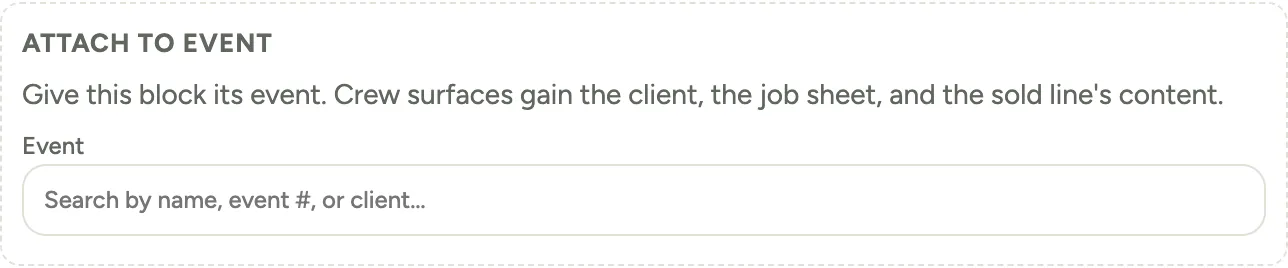 Screenshot from a demo workspace; data illustrative.
What the crew gets the moment you do it is the point of the exercise. The row on their schedule stops saying the work has no event and names the client and the event instead, and the job sheet gains the venue address and Setup by, the time the install has to be finished, as far as the event records them. Crew who have permission to open events get that name as a link; everyone else reads it as text. Before, a block created without an event stayed that way for its whole life.
One thing attaching does not add is a sold line’s own description, internal notes and reference photos. Those ride on the proposal line a block was seeded from, and only Seed backlog makes blocks that have a line behind them, which is also why those blocks already carry their event and never show this panel.
Let one session name several events
A batched prep session is the case a single event cannot express. Six hours of processing that feeds a wedding and an anniversary dinner does not belong to either of them, and picking one would be a lie you would then have to remember.
Open Serves events at the bottom of the editor, add each event with the same search box, and give each one a Share. The panel opens by itself on a block that already has events on it, so you can see them without hunting. Shares are weights rather than percentages: on a six hour session, four and two says two thirds of it was the first event’s. Use whatever numbers describe the split honestly, hours being the easiest to reason about.
Changes here do not save as you type. Save events stays greyed until you have actually changed something, and it writes the whole list at once, so removing an event and adding another is one action rather than two.
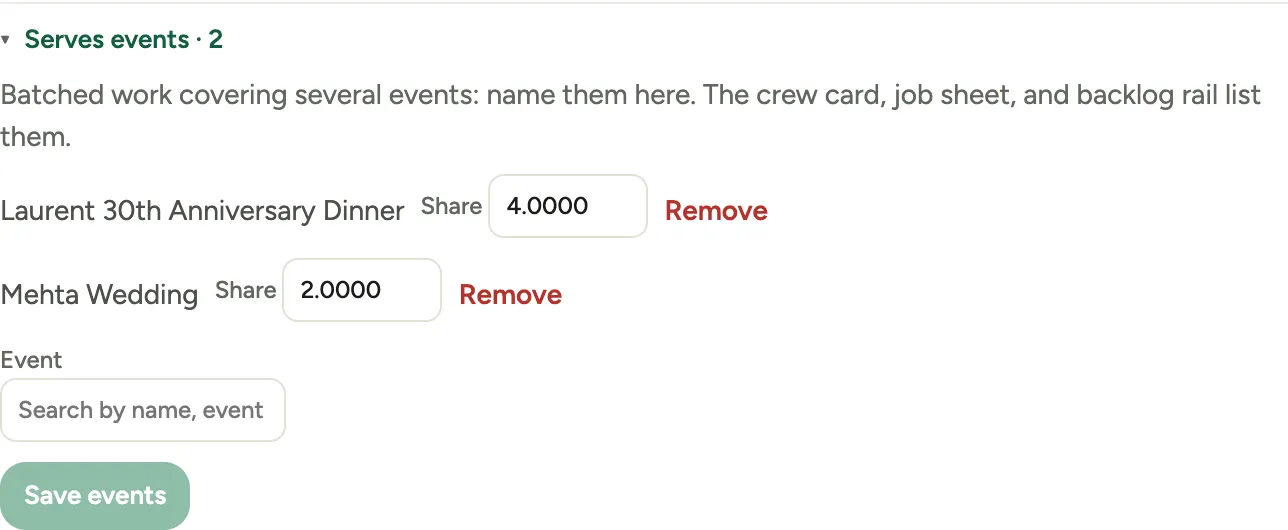 Screenshot from a demo workspace; data illustrative.
The crew sees the result everywhere the block appears. The row on their schedule reads as a count of events, “2 events”, followed by both names, instead of saying the work has no event. The job sheet says the same at the top, and on the Capacity board the backlog card shows the count.
What shares do not yet do: they record who the work was for, and nothing more. Hours punched against a batched block are not split across the events it names, so those events’ scorecards do not learn anything from it. Time attribution is a separate piece of work that has not been built. Use shares to tell people what a session was for, not as a costing tool.
When to leave a block alone
Cooler cleaning, sample builds, rack resets: standing studio work belongs to no event and never will. Florio reads that from the kind of work rather than from the missing event, so those blocks say Standing studio work · not tied to an event, which is a statement rather than a complaint.
Prep, setup, breakdown and the rest of the event phases are different. When one of those has no event, something has gone wrong, and the crew’s row says Not tied to an event to say so. That is the one worth acting on, and Attach to event is the fix.
Good to know
- Attaching is audited like any other change to a block, so the activity log records who gave a block its event and when.
- Neither action is available on work Florio manages on your behalf, such as a service visit’s own dispatch block. Those answer to the record that created them.
- Adding an event twice to Serves events is ignored rather than refused, and a share of zero is refused: every event named has to carry some of the work.
- A block’s status stays a manager’s call. There is no control anywhere for a crew member to mark a block done, so a session that has been worked to completion still reads as planned until someone sets it. Crews complete work items, not blocks.
- Where this fits: Scheduling: crews, the backlog, and the week.