Read the Project status report
The Live profit panel is one job. The Project status report is all of them: every open contract with the same numbers side by side, computed nightly, so the owner or the bookkeeper can see which jobs are ahead of their billing, which are behind, and where the cash is still out. It lives under Reports, in the money group.
Before you start
The report shows for people who can see project money, the same permission as the Live profit panel. Every open contract appears, whichever recognition method it uses.
The page
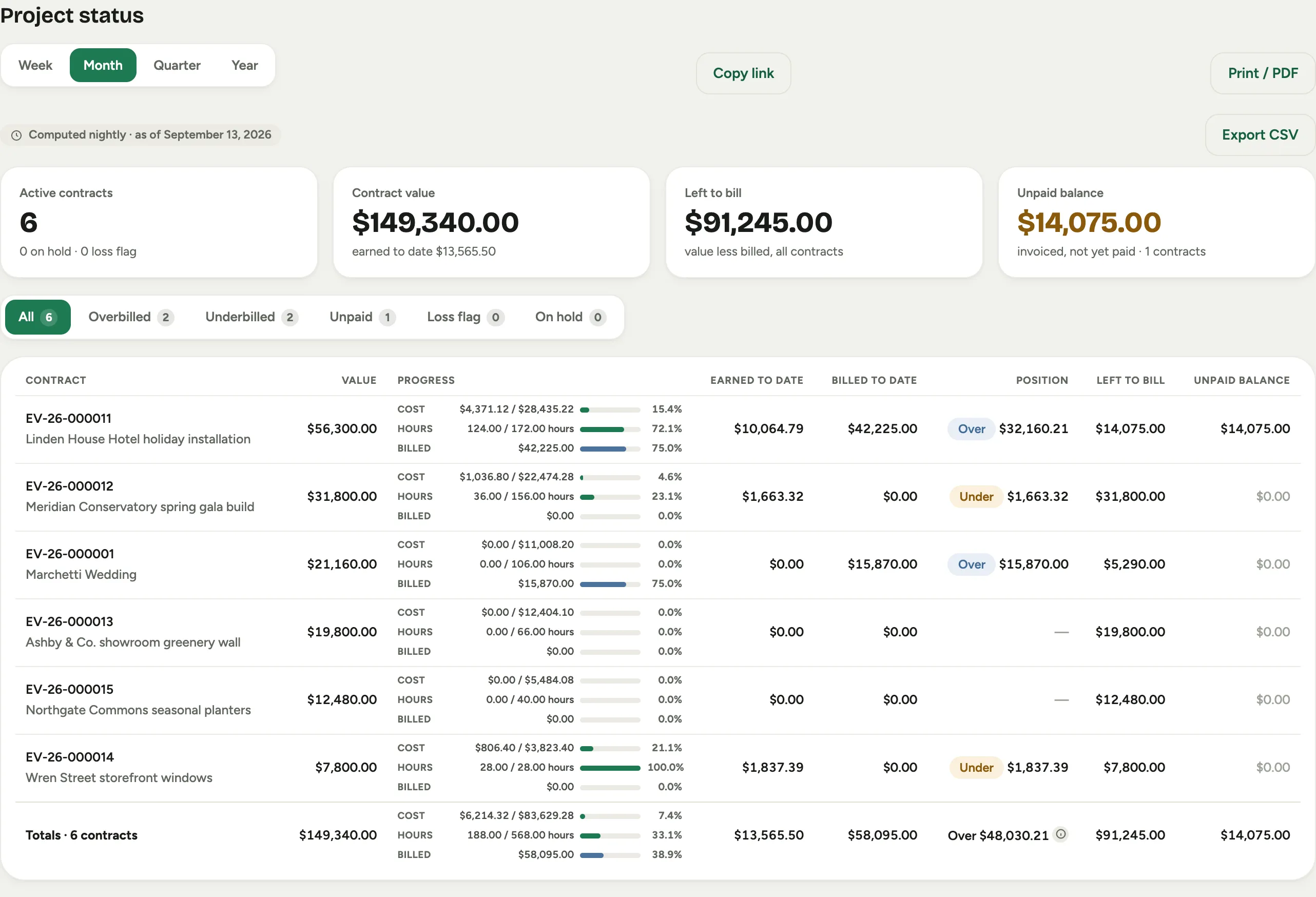 Screenshot from a demo workspace; data illustrative.
The stamp at the top says when the numbers were computed. The four stats are the portfolio: Active contracts (with how many are on hold or carry a loss flag), Contract value (with what has been earned to date under it), Left to bill across every contract, and the Unpaid balance: invoiced but not yet paid, with the number of contracts it sits on.
The chips filter the rows: All, Overbilled, Underbilled, Unpaid, Loss flag and On hold, each with its count.
The columns
- Contract: the project number, its name and client. An on-hold contract carries an On hold chip here, and a contract projected to lose money carries Loss.
- Value: the contract value, base plus approved change orders.
- Progress: three bars with their numbers beside them. Cost is actual over projected cost; Hours is hours worked over hours sold; Billed is the billed amount over the contract value. Hover a bar for the exact fraction. The billed bar is blue so billing never reads as work progress; a cost bar past 100% fills completely and turns red, which is the signal that a re-estimate is due.
- Earned to date and Billed to date: what the work has earned and what has been invoiced or paid.
- Position: Over when billed exceeds earned, Under when earned exceeds billed, with the amount under the chip. A dash means nothing has been billed or earned yet.
- Left to bill: value less billed.
- Unpaid balance: invoiced, not yet paid. The cell’s tooltip gives billed less received.
The totals row foots every column. Its position shows overbilled and underbilled separately, never netted; the tooltip gives both.
Export it
Export CSV downloads the whole table, every column, as a file named for the as-of date. It is the table as you see it, with no filter applied.
Good to know
- The percentages are computed against projected figures that move when a change order or re-estimate is approved, so a row can step backward the day after an approval. That is the approval landing, not work being undone.
- Hours worked are approved punches only. A crew that punched yesterday and has not been approved yet does not count until a manager approves the entries.
- The period picker at the top of every report does not change this one: a contract has one current position, not a history. The recognition close holds the month-by-month record.