Let Florio read your vendor mail
Your vendors already tell you everything Florio wants to know. They send an order confirmation when they take the order, a shipping notice with the tracking numbers, and an invoice at the end. Somebody reads each one and types a little of it somewhere. Vendor mail does the reading.
Purchasing › Vendor mail lists every document Florio has read, newest first. The sidebar badge counts the ones waiting for a person. An admin has to turn this on and name the mailboxes first: see Set up vendor mail.
The list
Four stats across the top say how the reading is going: Read, Attached on their own, Needs a look, and Draft bills waiting to be pushed. The chips filter by All, Needs a look, Shipping notices, Order confirmations, Invoices and Set aside.
Each row is one document: what it is and who sent it, what Florio found in it, which order it belongs to, and what you can do about it.
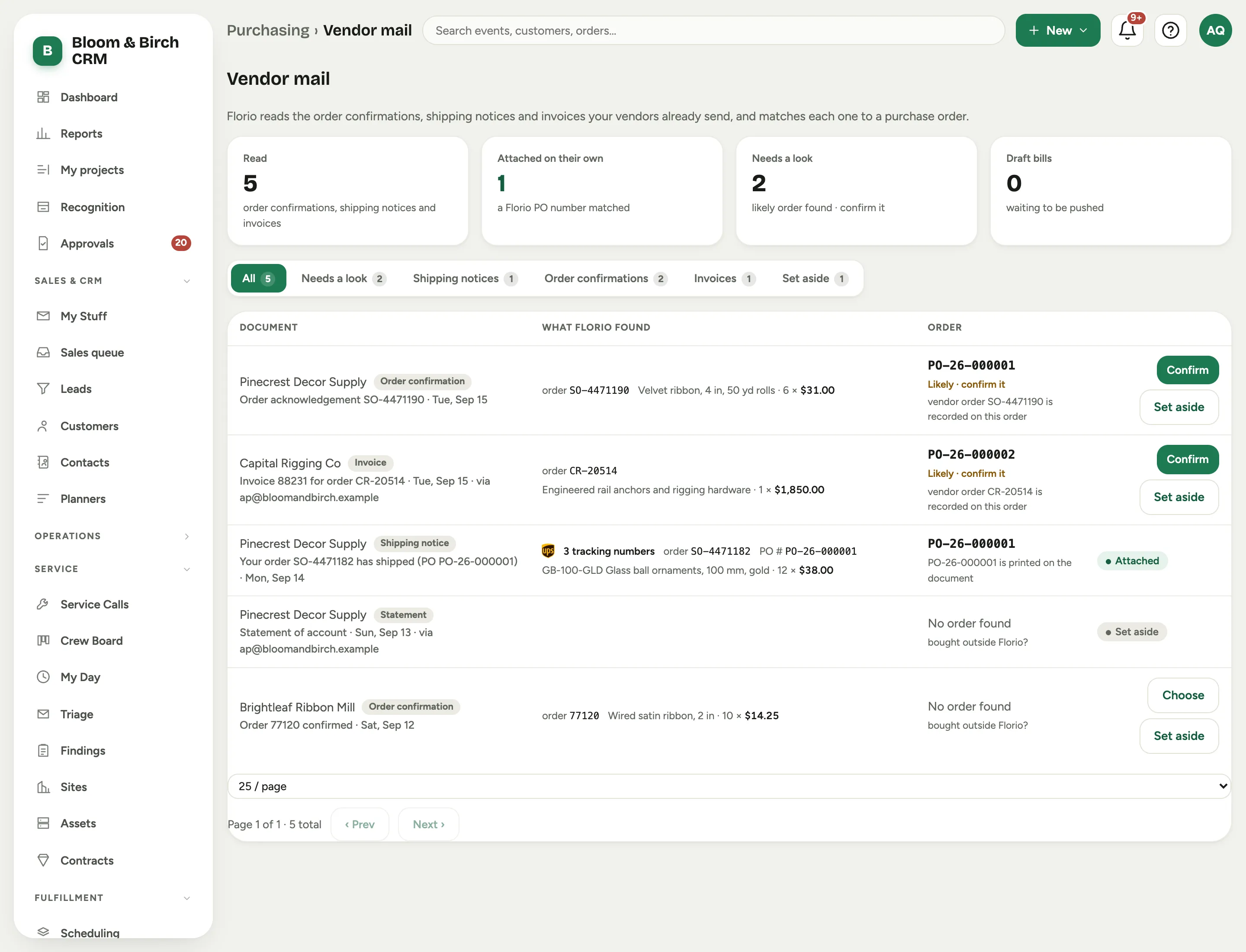 Screenshot from a demo workspace; data illustrative.
What Florio found is the useful part of the document pulled out: the Vendor order no., the Invoice, the Customer PO field, the Tracking numbers, the line items. A document that arrived through a group shows the vendor with via ap@ beside it, because the group’s copy carries the group as the sender and the real vendor underneath.
Florio reads the attached PDF as well as the email. Some vendors send an email with nothing in it but a PDF, and an invoice often carries its tracking numbers only inside the PDF. Florio finds the order number, the PO field and the tracking numbers there too.
A row whose message carried a PDF says so: Invoice · PDF. Open the document and each PDF sits at the top as a chip with its name and size; click it to read the file in a new tab. A message with no PDF says it was read from the email itself.
Lines as the vendor printed them
Florio shows each line the way the vendor wrote it, so you can check it against the paper. Wire and cable are often priced per hundred or per thousand feet, so a line reads like 5,000 ft × $389.34 / M = $1,946.70. Hover / C or / M to see per hundred or per thousand. A line the vendor did not price says it was not priced, and a credit memo’s lines read as money back.
Totals lists the figures the vendor printed: subtotal, freight, tax and total. Florio never adds up the lines to stand in for a total that is not there.
When a line’s quantity and price do not come to the amount printed beside it, the line carries a warning mark. When the lines do not add up to the printed subtotal, a strip under them says so: These lines add up to $1,946,700.00, and the invoice prints $1,946.70. That is almost always a price read in the wrong unit, and it is why Florio checks an invoice before it drafts a bill from it.
What attaches itself
One thing, and only one thing, is enough for Florio to act without asking: your own Florio PO number, printed on the document. Nothing else is certain enough. Those rows read Attached, with the reason spelled out: PO-26-000014 is printed on the document.
Just the digits count too. Plenty of purchasers type only the number’s digits into the vendor’s
PO field: 058213 for PO-058213. Florio treats that as your PO number when the email comes from
that order’s vendor, and attaches it the same way: the PO field reads 058213, which is PO-058213.
From any other sender, the same digits make it a suggestion in Needs a look instead.
This is why typing your Florio PO number into each vendor’s PO field matters so much. Vendors print back what you give them. Do it and shipping notices attach themselves; skip it and every one of them waits for a person. It costs nothing and it starts working the same day.
Florio never places an order by itself, even with a PO number on the document.
Needs a look
Everything weaker than a PO number lands in Needs a look, with what Florio thinks and why:
- vendor order 17692210 is recorded on this order
- tracking number 1Z999AA10123456784 is already on this order
- the vendor, part and quantity fit exactly one open order
These are good guesses, and good guesses are not facts, so nothing changes until somebody clicks. Each row offers Confirm, Choose another order, or Set aside. A document Florio could not place at all reads No order found, and asks whether it was bought outside Florio.
Statements, quotes and receipts are filed as Set aside on their own, so they never sit in your way. So are vendor newsletters, which Florio files without reading: see Which senders it reads.
What confirming does
Before you confirm, the row tells you exactly what will happen under Confirming will, some combination of:
- Add the boxes to the order’s lines: the tracking numbers on the document, on the lines they belong to, checked from then on like any other package.
- Record the vendor order number on the order, so the vendor’s next email about it matches by itself.
- Create a draft bill for invoice 00840266, at the invoice’s prices, with freight and tax as their own lines, because the invoice is what you will pay. A price that differs from the one on the purchase order is flagged on the line. The draft keeps the invoice’s PDF, so it reaches QuickBooks with the bill.
- Place the order, only when the order is still a draft, and only ever on your click.
A draft bill is a draft. Pushing it to QuickBooks stays a person’s action on the purchase order, and vendor mail never pushes anything.
Florio drafts a bill only when the invoice adds up. The lines have to come to the total the invoice prints, a total has to be printed at all, and every line has to be on the order. When one of those fails, the card says no bill will be drafted and why, for example its lines add up to $1,946,700.00, and the invoice prints $1,946.70, and you enter the bill on the purchase order yourself. The boxes and the vendor’s order number still go on the order. An invoice that attached itself but whose bill Florio would not draft waits in Needs a look with that reason.
Already entered that invoice by hand? If the order’s vendor already has a bill with the same invoice number, confirming ties the document to that bill and drafts nothing. Draft bills counts only bills not yet pushed, so a bill you already pushed is not counted again.
Confirming a document that came through a group from an address Florio did not know also teaches Florio who that is: the address is learned for the order’s vendor, and its mail is read from then on.
On the purchase order
Once vendor mail is on, every purchase order has a Vendor documents card under its bills. It lists each document attached to that order, newest first, and says what each one did:
- the boxes it added, and the line they went on;
- the vendor’s order number it recorded;
- the bill it drafted, or a bill already entered that it was linked to;
- no bill drafted for the invoice, with the reason, when the invoice did not add up;
- or Nothing new for this order, with why: no tracking numbers in it, say, or the order already had that order number.
Each row shows the document’s PDFs as chips you can open, says whether it attached on its own (and what it printed) or who confirmed it, and links to the document with Open in Vendor mail. On an order with nothing attached yet, the card is a reminder that the vendor typing your PO number into their PO field is what makes their mail attach on its own.
In the order’s activity, each Vendor document attached line says what the document did, and its number takes you to its row on the card.
A bill drafted from vendor mail carries the invoice’s PDF. The chip on any bill opens its PDF, whether vendor mail brought it or you captured it yourself.
Good to know
- Reading starts the day you switch it on. Turning vendor mail on does not go back through your history, so what arrived before that day is not read.
- Only vendor mail. Florio reads mail from the vendors it knows and mail your groups relay, in the mailboxes an admin named, and never mail between people at your company. Senders on your Exclusions (never capture) list are skipped.
- One message, one document. Mail sent to a group lands in every member’s mailbox; Florio recognises the copies as the same document and reads it once.
- A bill Florio drafted credits nobody. A draft bill read out of an invoice nobody opened is not recorded as entered by a person, because no person entered it.
- A document it cannot read says so and stays in the list rather than disappearing.