See who opened your proposal
“Viewed 3 times” is only useful if you can ask what the three were. Now you can. Every view and open count in Florio is a link, and opening it shows the list behind the number: each visit, when it happened, roughly where it came from, and what opened it.
The counts also got stricter. A proposal that nobody had read could easily show four opens, because mail systems and link scanners fetch things on their own. Those visits still appear in the list, they just no longer inflate the number.
Where you will see it
Anywhere Florio shows a view or open count, the count is underlined and clickable:
- the Delivery panel on a proposal, per recipient. Each person’s count opens that person’s own activity, not the whole proposal’s, so a link you re-sent does not mix its history with the older one it replaced
- the proposal rows on an event
- an order’s client sign off receipt
- the lookbook panel on a lead
The activity list
Open a count and you get a summary across the top, then one row per visit, most recent first.
The first line says when that link went out, so you can see how long it sat before anyone looked. Below it the summary counts Views, Email opens, Downloads, and People. If the same proposal was opened by more than one person, Florio says so plainly: that usually means your contact forwarded it, which is worth knowing before you follow up.
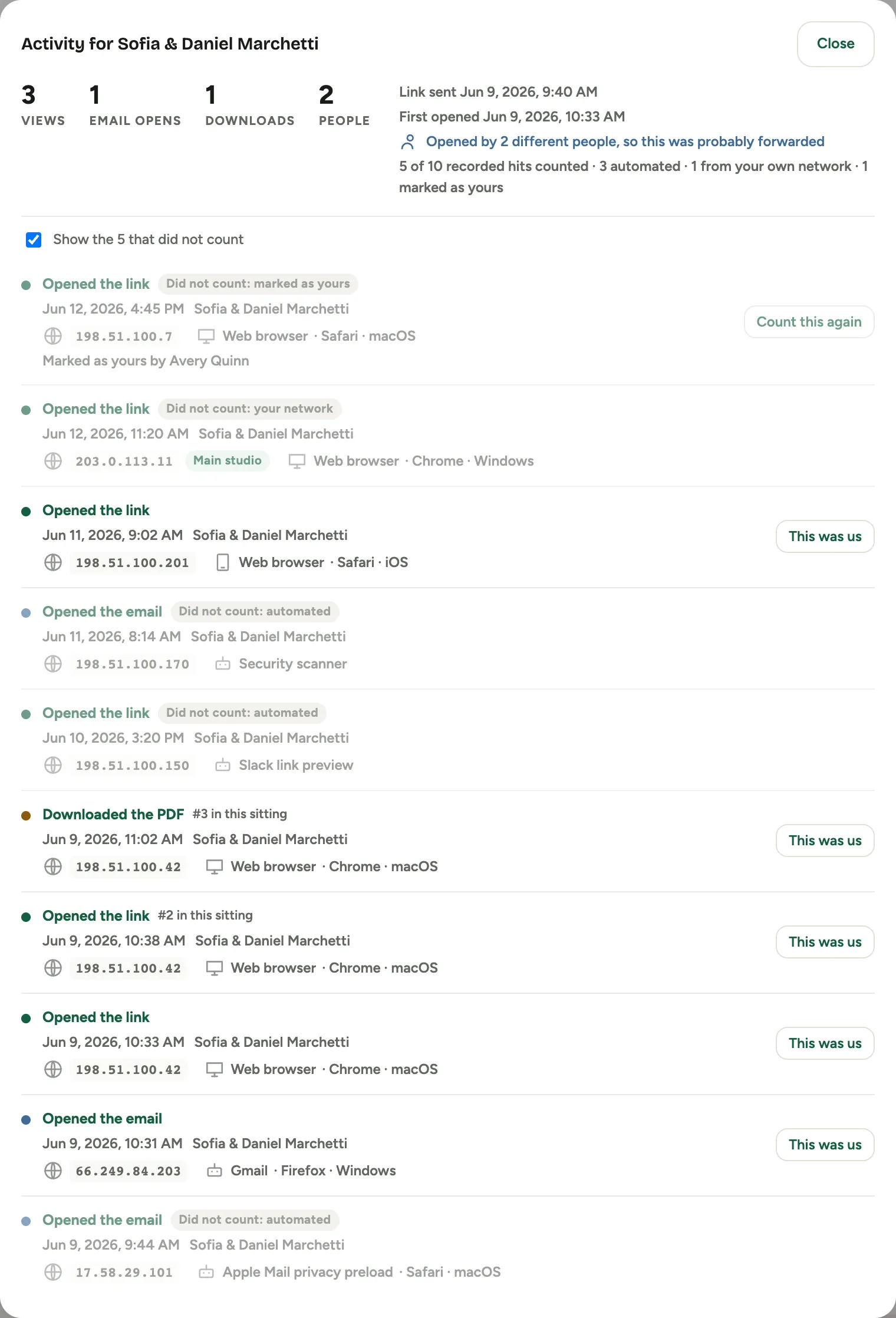 Screenshot from a demo workspace; data illustrative.
Each row tells you when the visit happened, which recipient’s copy it was, the address it came from, the network that address belongs to, a rough city, and what opened it: a web browser, a phone, a mail app. Repeat activity from the same device within about half an hour is marked as part of the same sitting rather than counted as a fresh visit, so a client refreshing a page does not read as renewed interest.
Why the number is smaller than the list
Three kinds of visit stay in the list but do not count. Each row says which it was.
Did not count: automated. Something other than a person opened it. Mail providers preload images the moment a message is delivered, whether or not anyone reads it. Corporate mail security opens links before the recipient ever sees them. Chat apps fetch a preview when someone pastes a link. None of that is a human reading your proposal, so none of it counts. One of these is still worth reading: a chat preview means your proposal was shared somewhere, which is a real fact even though it is not an open.
Not every automated visit is discounted. Some mail providers only fetch images when the recipient actually opens the message, and those do count, because there really was a person.
Did not count: your network. The visit came from an address your studio browses from. This is the one that stops your own pre send check from reading as client interest. See register your own networks.
Did not count: marked as yours. Someone pressed This was us on that row. The row shows who did it.
If anything was excluded, a checkbox above the list lets you fold those rows away and see only what counted. The summary keeps the full accounting either way, so the number is never unexplained.
Reading the two labels on an address
An address can carry two labels, and they mean different things.
Your IP means the visit came from the same address you are browsing from right now. On a shared office connection that is everyone in the building, so read it as “from where I am”, never as “this was me”. On its own it does not discount anything: a client can genuinely sit behind the same public address as you, in a shared building or at a hotel, and Florio would rather count a real open than hide one.
A network name, like Main office, means the address falls in a range you registered as yours. That is the label that actually separates your own traffic from a client’s, and it is the one that takes the visit out of the count. It keeps working when you are somewhere else.
Both can appear at once, and that pairing says more than either alone.
Was that us?
If a visit that counted was actually someone on your team, open the row’s This was us and it drops out of the number. The row stays in the list with your name on it, and Count this again puts it back.
You will only see the button on visits that counted, or that a person marked by hand. An automated or own network visit is already out of the count, and there is no way to add one back in.
Good to know
- Nothing is written in stone. All of this is worked out fresh each time you open the list, so registering a new office range corrects your whole history at once. There is no reprocessing step and nothing to re run.
- Your older proposals light up too. Florio has been recording this detail all along, it just had nowhere to show it. Open any past proposal’s count and the list is there.
- The city is a region, not an address. Location comes from a public database that places an internet provider’s block at a regional centre, so a studio in one suburb often reports as the nearest large city. Read it as a hint. The network name beside it is the more reliable line, and for a corporate visitor it frequently names their employer outright.
- An address is not a person. Two people in one office share one address, and a phone changes address as it moves. The list is evidence about where a visit came from, not proof of who it was.
- Full detail on the proposal record: Proposals.