Connect your carriers
Florio can store a tracking number without any of this, and link out to the carrier’s page. What a connection adds is Florio going and asking, so a purchase order, a project’s Materials tab and a service call all say where the boxes are without anyone opening a carrier’s site.
Admin › Carrier connections, which needs the carrier-connections permission. That permission is admin only and deliberately not granted to managers, because these are your company’s account credentials.
Why you connect your own accounts
Florio holds no carrier credentials of its own. UPS and USPS show tracking only to a party with a real interest in the shipment, and FedEx’s developer licence does not allow one customer’s data to be passed to another. So each workspace connects its own accounts, and sees its own shipments.
The cards
One card per carrier, each in one of four states: Not connected, Connected, Needs attention when the carrier has started refusing, and Paused. A connected card shows the environment, the last characters of the account and key, who saved the credentials and when, and what it is Checking now: so many packages on so many orders, with the last check time.
Credentials are write-only. Once saved, nothing shows them again and nothing hands them back: the card shows a key’s last four characters and Saved · 15 Sep 2026 by Dana Reeve. The audit record keeps the carrier and the environment, never a value.
Save and turn on tests the credentials with the carrier before storing them, and refuses what the carrier rejects, with the carrier’s own reason rather than a generic failure. Test connection tries what you have typed without saving it, and where your workspace has a package on the move it looks that one up as proof.
Leave Environment on Production unless you are deliberately trying a carrier’s sandbox, which only answers about that carrier’s own test numbers.
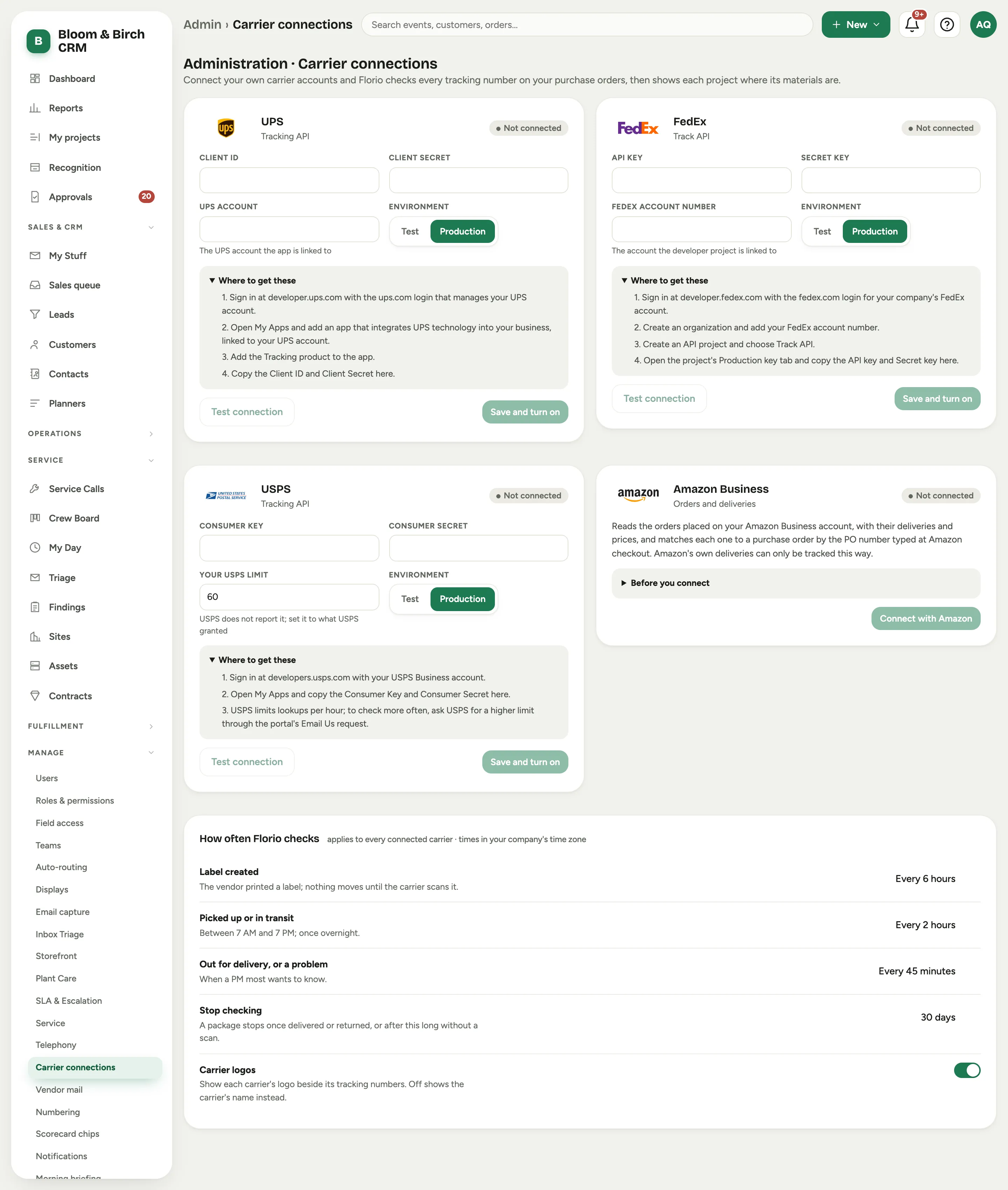 Screenshot from a demo workspace; data illustrative.
What each carrier needs
Each card carries its own Where to get these steps. In short:
UPS needs a ups.com login that manages your UPS account. At developer.ups.com, add an app for integrating UPS technology into your business, linked to that account, add the Tracking product, and copy the Client ID and Client secret. The UPS account field is optional, but fill it in: UPS uses it to decide how much it will tell you about a shipment somebody else paid for.
FedEx needs a fedex.com login on your FedEx account, and the account number with its billing address. At developer.fedex.com, create an organization, add the account, create an API project, choose Track API, and copy the API key and Secret key from the project’s Production key tab.
USPS needs a USPS Business account. At developers.usps.com, open My Apps and copy the Consumer key and Consumer secret; tracking is already in the default bundle.
USPS is the one carrier with an extra field. Your USPS limit is how many lookups an hour USPS allows you, and USPS does not report it, so Florio cannot read it: type what USPS granted. Left blank, Florio assumes 60 an hour and paces itself to that rather than collecting refusals. To get more, ask USPS through the developer portal’s Email Us request.
How often Florio checks
One schedule covers every connected carrier, in your workspace’s time zone:
- Label created: the vendor printed a label and nothing moves until the carrier scans it, so this can be slow.
- Picked up or in transit: between the start and end of your day, plus one check overnight.
- Out for delivery, or a problem: the moment somebody most wants to know, so the shortest gap.
- Stop checking: a package stops on its own once delivered or returned, or after this long with no scan at all.
Carrier logos shows each carrier’s mark beside its tracking numbers; off shows the carrier’s name as a quiet chip instead.
When something goes wrong
A carrier that rejects the credentials turns the card Needs attention and shows what the carrier said. Florio stops asking that carrier for that workspace until an admin tests or replaces the credentials; every other carrier carries on, and every package and scan already recorded stays exactly where it is. The same is true of Disconnect: it stops the checking, it deletes nothing.
Amazon Business
Amazon is on this screen but it is not like the others. There is no key to paste: access is granted by Amazon, to a reviewed company, after an access request, a review, developer registration with photo identification and a video call. Until your workspace has been through that, the card reads Available once Amazon approves API access for your account.
It is worth starting early if you buy on Amazon Business, because Amazon’s own deliveries cannot be tracked through UPS, FedEx or USPS, so asking Amazon is the only way. Amazon answers about an order, not a tracking number, which means the purchase order number typed into Amazon’s checkout PO field is the only thing that ties an Amazon order to a Florio one.