Approve planned cost
Price is governed: a change to what the client pays goes through proposal approval and the client’s signature. Labor is governed: an hour reaches job cost only when a manager approves the punch. Planned materials were the gap. Anyone who could edit an event could add a $1,850 line of rigging hardware and no approval anywhere would know. Cost governance closes that gap the way a good office already works: the line records freely, it is visibly unapproved until a re-estimate covers it, and the job should not be closed with unapproved cost still standing.
What unapproved cost is
The contract’s Projected Final Cost is the approved estimate: the proposal’s cost baseline plus every approved change order and re-estimate. A materials line is a commitment to spend. Until an approved revision accounts for it, the line’s cost (quantity times unit cost) is unapproved, whichever way it is costed. A returned line counts nothing.
Small amounts do not need an approval. Your workspace carries two tolerances, a dollar amount and a percent of the approved cost; the unapproved total on a project must sit inside both to be treated as covered. The seeded values are $500 and 1%, so a box of floral wire never raises a change order, while an anchor kit does. The tolerance is measured on the project’s running total, not per line, so a hundred small lines do not slip through together.
Where it shows
- On the Contract card, an Unapproved cost block above the ledger with the amount, how many lines it sits on, the projected final cost as approved and with this included, the split by cost category, and the Raise re-estimate action. When everything is covered the block goes quiet and says so.
- On the Live profit panel, an Unapproved cost row under the total, with the projected cost and the margin read both ways. See Read the Live profit panel.
- On the Materials tab, an Unapproved cost stat and an approval mark on every line, a green check or a red exclamation beside the item (its tooltip reads Approved, Partly approved or Not approved), with a Not approved filter chip.
- On My projects, as the Next action for the project.
 Screenshot from a demo workspace; data illustrative.
Raise the re-estimate
Raising is a planning act, so it belongs to whoever plans materials, usually the project manager.
- On the contract card, choose Raise re-estimate.
- Write Why this cost is needed: what changed on this job. This is the reason the approver reads.
- Choose Create the draft. Florio drafts an internal change order for the full unapproved amount, split by cost category from the lines themselves. Nothing is approved yet; the draft sits on the Revision ledger as an Internal CO in Draft.
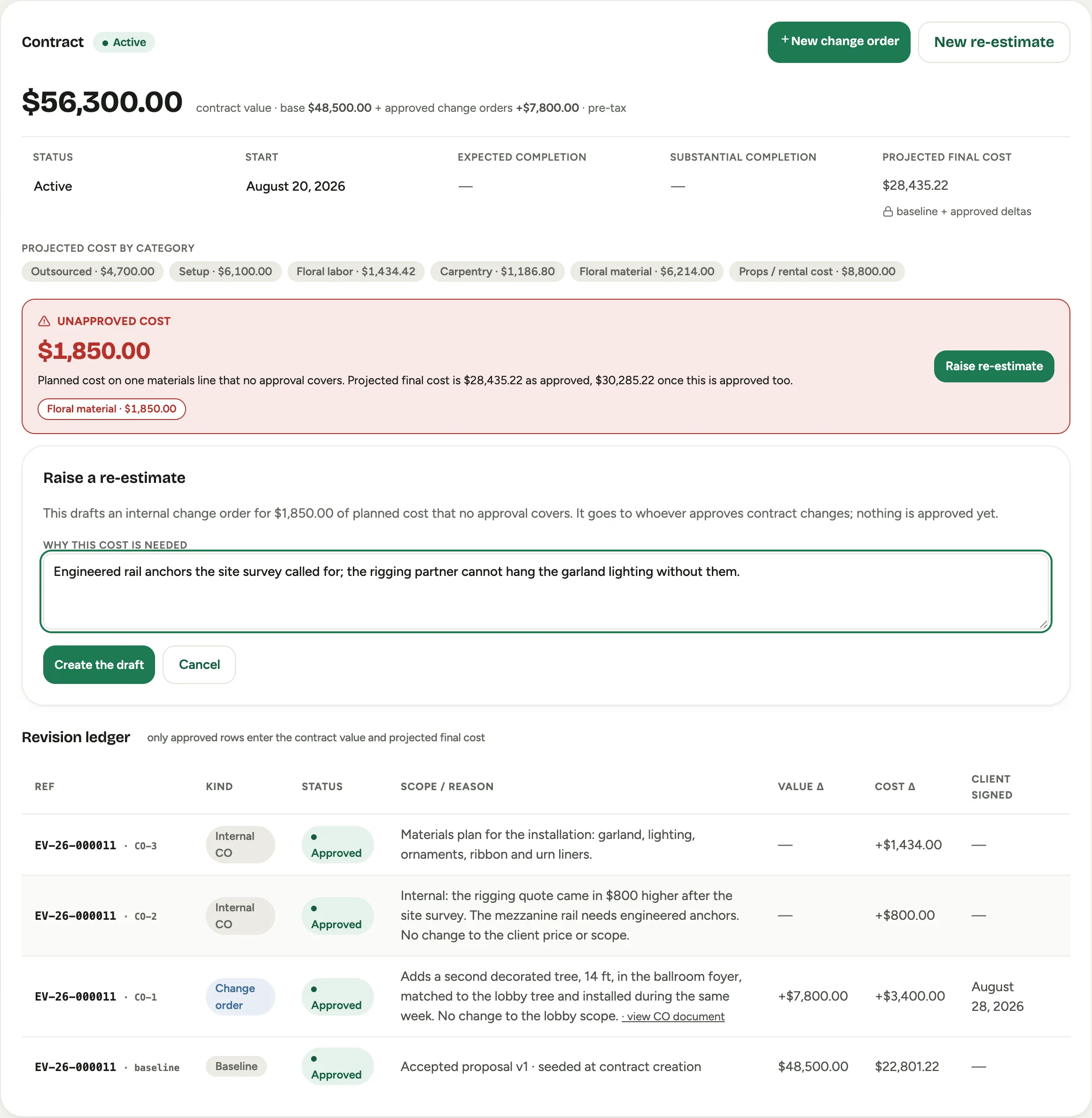 Screenshot from a demo workspace; data illustrative.
Only one governance draft can be open at a time, since two would each carry the full total.
Approve it
Approval is a finance act and stays with the permission to approve contract changes. On the ledger row, Submit for approval moves the draft to Pending approval; Approve approves it, and Void discards it.
When a re-estimate is approved, two things happen at once: the projected final cost moves by the approved amount, exactly as any revision, and every line it covered is stamped with that revision, for the amount it approved. Years later, “who approved this $1,850” has an answer on the line itself.
Approval re-checks first. If the unapproved cost on the project moved after the draft was raised, because someone added or deleted a line in between, approval refuses rather than stamping cost the approver never saw, and asks you to void the draft and raise it again.
A line edited upward after it was approved shows Partly approved: the approved amount stays approved, and only the increase counts as unapproved.
Closing a project
The intent is plain: a project should not be closed while unapproved cost stands on it. In this release that is a rule for people, not yet a gate in the product. Florio already computes the check, but no screen shows it and nothing holds the event’s final stage yet; the close gate that refuses to finish a project with unapproved cost arrives in a later release. Until then the surfaces above, and the Next action on My projects, are what make the standing cost impossible to miss.
Good to know
- A project with no contract is counted and shown but never flagged: there is no ledger to approve against, so the amount is information until a contract exists.
- Unapproved cost never blocks entry. A project manager writes down what they know they must buy, and the record exists from that moment; the gate sits on the approval, not the keyboard.
- The tolerances are configured with your workspace, not on a screen; see Set up Projects.