Create and delegate tasks
A task in Florio is a one-liner attached to the record it belongs to: the event, the lead, the client, the order. Creating one takes a sentence; delegating one takes a click, and the teammate finds out by email, not by luck.
Before you start
- Creating and editing tasks needs the task manage permission, which the standard designer, sales, and crew roles all have.
Steps
-
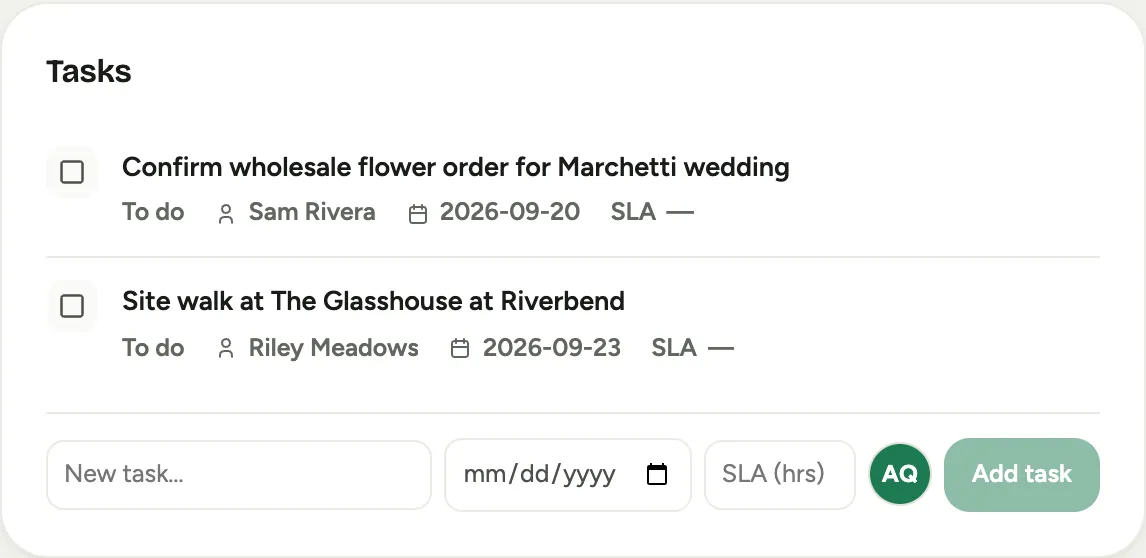
On any record, open the activity composer and pick the Task tab (on an event it lives on the Activity tab), or use the add row at the bottom of the Tasks card on the event’s Overview tab.
-
Type the task as you would say it: “Confirm final centerpiece count with the client.”
-
Leave Assigned on yourself, or pick a teammate to delegate. Delegating sends them a branded email with the task, the due date, and a link back to the record, and the hand-off is noted in the record’s activity log.
 Screenshot from a demo workspace; data illustrative.
 -
Set a due date if the task has one. On the Tasks card you can also give it an SLA in hours, a harder promise than a due date: breach it and the task is flagged and can alert people.
-
Work the list. Change status inline (To do, In progress, Blocked, Done), re-assign, or adjust dates right in the row. Open tasks sort by whichever deadline is nearest, due date or SLA, so tonight’s SLA outranks next week’s due date.
Good to know
- Tasks you were assigned collect in your Sales queue under Open tasks and at the top of My Stuff, and the Dashboard counts your overdue ones. Each one names the record it belongs to, number first, as a link, so you never need to write the project number into the task itself.
- Completed and cancelled tasks stay on the record, struck through, most recent first.
- Some tasks arrive on their own: assignment queues push incoming work (a new lead, a delivery run) to the right person, and those behave like any other task once assigned.
- Every create, hand-off, and status change is in the record’s activity log, so “who dropped this” has an answer.
- Where this fits: Tasks, follow-ups, and reply SLAs.