How Florio works with QuickBooks Online
Accounting is where a lot of event-software promises quietly fall apart: the reports in the app don’t match the numbers in the bank. Florio’s answer is to treat QuickBooks Online as the system of record and keep your operational data reconciled against it, so a number on a Florio report is a number your accountant recognizes.
The integration runs in two directions:
- Florio reads from QuickBooks continuously: invoices, payments, customer balances, and vendor costs, so what you see in Florio always reflects the books.
- Florio posts to QuickBooks once you turn posting on: invoices for delivered orders, deposit invoices for signed events, month-end plant-care billing, and the Stripe payments and refunds behind them. Posting is off until you deliberately turn it on, and Florio checks its own readiness before it lets you.
Set up the integration, step by step
The setup is a short guided journey. Do the stages in order; each one has its own walkthrough with a screenshot for every step:
- Connect QuickBooks Online: create the connection from Admin, then QuickBooks.
- Map your items and accounts: tell Florio which of your QuickBooks products, services, and accounts each kind of billing uses.
- Set up sales tax: match each place you do business to the tax code QuickBooks should apply there.
- Match your customers to QuickBooks: link the customers you already bill in QuickBooks so nothing gets billed twice or duplicated.
- Go live: pass the readiness checks, set the go-live cutover date, and turn posting on.
After go-live, work with QuickBooks day to day explains what posts automatically and what it looks like in your books, and troubleshoot the QuickBooks connection covers the rare moments something needs a person.
What syncs from QuickBooks into Florio
Florio keeps a live read connection to your QuickBooks Online company:
- Actuals on every event. Invoices, payments, and vendor bills recorded in QuickBooks flow back onto the matching Florio event, so you can see quoted vs actual side by side.
- Incremental sync. Florio pulls changes on a schedule (every hour by default) rather than making you export and re-import spreadsheets.
- A review queue for anything unmatched. When an invoice can’t be tied to a record automatically, it lands in a queue for a person to resolve. Nothing is guessed silently.
Match a customer to QuickBooks
For invoices and payments to land on the right event, each Florio customer needs to point at the right QuickBooks customer. Florio makes that link automatically wherever the names line up, but some never match on their own: one your books file as “Posner, Shara” against a customer you call “Shara Posner”, a venue spelled two ways, or one the automatic pass simply missed.
You can set those by hand from the customer record. The QuickBooks customer field shows the current link, or Not linked when there isn’t one yet. Click it to open a search of your QuickBooks customers by name or email; each result shows its city, state and open balance so you can tell two similar names apart, and you link the right one in a click.
If the customer you pick is already linked to a different Florio customer, Florio stops and asks you to confirm before it maps both to the same account, so a mismatched pick can never quietly send two clients’ billing to one place. Linking is available to people who can manage the QuickBooks connection. The full walkthrough, including the automatic matching pass, is in Match your customers to QuickBooks.
Why that matters: commissions on actuals
Most tools calculate commissions from the quote, the number you hoped for months before the event. Florio calculates them from actuals: what the books and the time clock say really happened. Flowers came in under budget? Labor ran long? The commission reflects it, because the finance data and the hours live in the same platform.
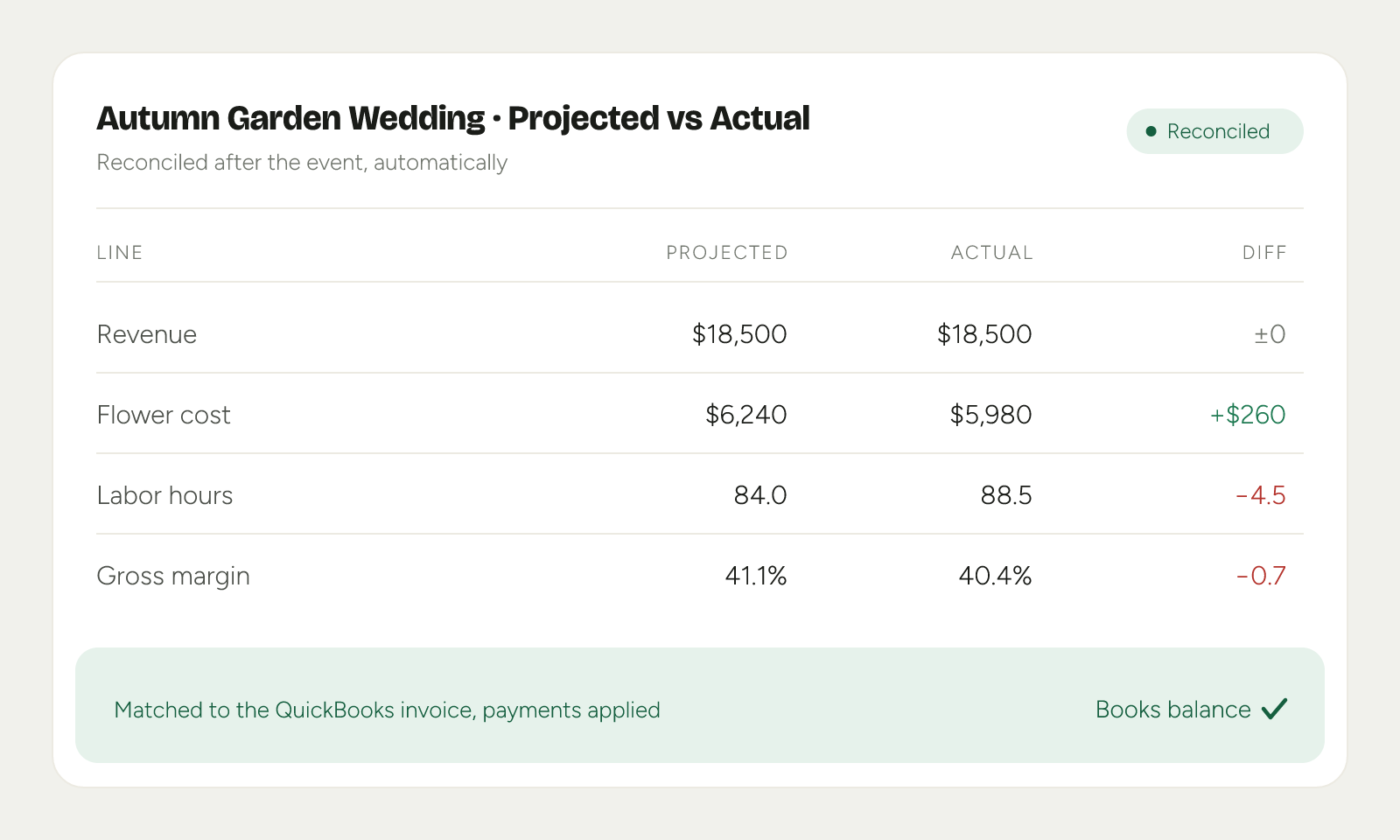 Product mockup; data illustrative.
The same discipline shows up elsewhere:
- Penny-accurate platform payouts: orders from outside marketplaces are reconciled gross → fee → net, so the deposit matches the record.
- Per-jurisdiction tax: estimated on the right base for each locality, consistent with how it posts downstream.
Expected cash, without inflating your books
Event studios collect in milestones: a deposit at signing, more as the date approaches. To see that future money in a receivables report, many studios pre-create every future invoice the day the contract signs. It works, but it inflates receivables and deposit liabilities with events that haven’t happened yet, and someone reconciles the difference every month-end.
Florio’s Cash / Receivables report gives you the forward look without touching the ledger. It reads the payment schedule already on each signed event and shows:
- Expected cash by period: what is due this week, this month, and beyond.
- Overdue and ready to bill: milestones past due or coming due soon, so nothing slips.
- Receivables aging as of any date: customer rows in the same aging columns your accountant already uses (Current, 1-30, 31-60, 61-90, 91 and over). Move the as-of date forward and watch how the book will age.
- Your QuickBooks receivables, folded in: tick “Show from QuickBooks” and everything your QuickBooks aging report counts (open invoices, credits, unapplied payments) appears alongside the Florio schedule, tagged by source, never double-counted, and reconciling with that report’s totals. Customer rows expand to show each event nested underneath, the same way your accountant’s report reads, and every line clicks through: to the event in Florio when we know it, or to an in-app transaction card with a QuickBooks link. The view opens instantly from a short-lived cache that refreshes itself in the background every few minutes.
Because the forecast is a report rather than a stack of future-dated invoices, your receivables stay clean and your deposit liability reflects money actually collected.