See where an order's boxes are
A purchase order that has been placed raises one question for weeks: where is it. Florio answers it in one cell, in the same shape everywhere the question gets asked: on the purchase order, on a project’s Materials tab, and on a service call’s Parts card.
The Tracking cell
Reading left to right, the cell is always the same lanes, so a column of them lines up:
- The carrier’s logo, in a fixed lane. A line with no tracking holds the lane with a faint dash. If your workspace turns logos off, the carrier’s name shows as a quiet chip instead.
- A five-segment track: label created, picked up, in transit, out for delivery, delivered.
- The status word: Label created, Picked up, In transit, Out for delivery, Delivered, Delayed, Returning, or No scans yet. A delay or a return draws the segment and the word in red.
- The date. Once a carrier has said something, this is the carrier’s estimate. Before that it is the date the vendor promised, marked vendor date. An estimate that lands after the day the job needs the part is drawn in warning colour with an icon, next to the warm Need by cell, so a late shipment is visible without opening anything.
- A count when there is more than one box: 1 of 4 boxes. The track shows the box that has got the least far, so a box nobody has scanned never hides one that has.
Two badges appear when they apply. Not received sits beside a delivered shipment the warehouse has not booked in yet; it reads In hand once they do. No scan in 5 days marks a number that has gone quiet, on whatever number of days your workspace set.
A line with several boxes, or one you want the detail of, opens in place from the chevron: each box, its last scan, the carrier’s estimate, and the reason for a delay.
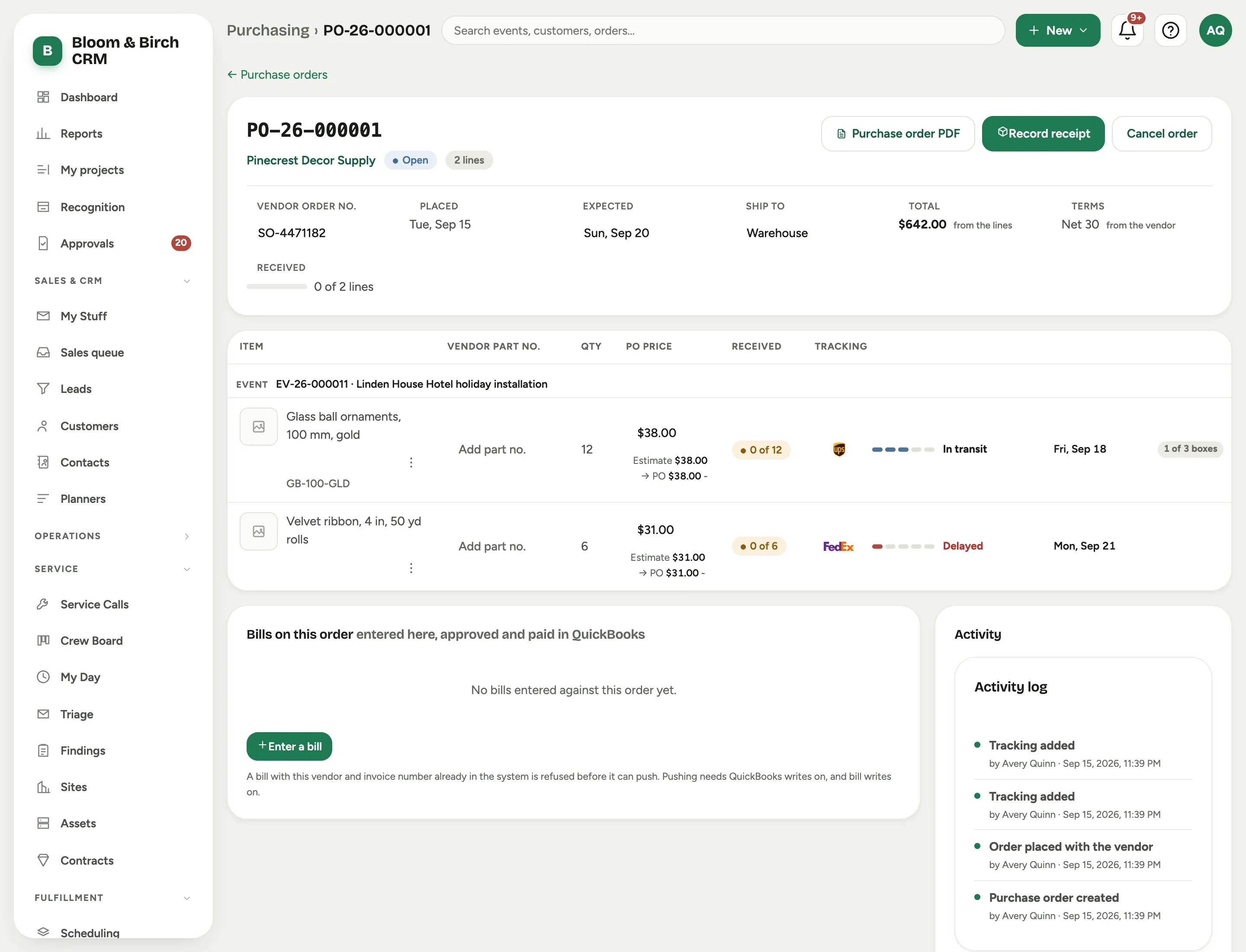 Screenshot from a demo workspace; data illustrative.
Add tracking
+ Add tracking sits at the foot of a line’s expansion on the purchase order, next to the vendor’s promised date. The Purchase orders list has one in its header too, for a number that arrives before you know which order it belongs to.
Paste one number or many; lines, commas or spaced groups all work. Florio recognises the carrier from the number itself and says so (UPS number), and tells you when a number fails that carrier’s check digit, which is almost always a typo. If it cannot tell, pick the carrier yourself.
Then say what the boxes carry: This line, Every line on the order, or Choose lines. Tracking belongs to an order, so a number can go on lines that sit on a purchase order, or on no line at all, but not on a line with no order. A number already stored is reused rather than duplicated; adding it again simply links it to more lines.
When a carrier is connected and it knows the shipment has siblings, Florio offers them: UPS says this shipment has 4 boxes. Add all of them, or just the one you pasted.
A number on the Unassigned tracking card of the Purchase orders list is one nobody has placed yet. Open it to put it on an order.
What a connected carrier adds
Without a carrier connection a tracking number is still stored, and still links out to the carrier’s own page. Connecting the account is what lets Florio go and ask.
Once connected, Florio checks each package on a schedule your workspace sets: roughly every six hours while only a label exists, every couple of hours in transit during your working day with one check overnight, and every 45 minutes once a box is out for delivery or something has gone wrong. It stops asking when a box is delivered or returned, or after it has gone quiet for long enough.
Each package’s card shows when it was last checked and when it will be checked next, where the number came from (typed by hand, read out of vendor mail, or offered by the carrier as part of a shipment), and every scan the carrier has reported. Open on the carrier’s site is always there.
If you correct a package’s carrier, Florio starts the lookup over: the status, the estimate and the scans are cleared and the box is checked again straight away.
Connecting an account is an admin job: see Connect your carriers.
On the Materials tab
The same cell is the Status column of a project’s Materials tab, so the tab answers “what is still coming and when” without leaving it. Two stats at the top read from it: Not arrived, and Carrier problems, which counts the shipments that are delayed or coming back.
Statuses you set yourself (To order, On order, In hand) stay editable in place. The ones Florio works out (Queued, partly shipped, or whatever the carrier last said) are not, because the carrier is the one saying them.