Repay approved expenses
Approved expenses are repaid through payroll. For each pay period Florio gives you a file of what each person is owed, and drafts one QuickBooks bill per person so the cost and the receipts reach your books. This page is for whoever runs payroll and the books. Both cards described here are on the payroll page, the same page as the hours export.
Before you start
- You need the permission to approve expenses at the final step to see either card, and access to the payroll page itself.
- Releasing a bill to QuickBooks also needs the permission to manage the QuickBooks connection.
- Each person needs a payroll ID for the import file, and a QuickBooks vendor on their employee profile for a bill. Florio names anyone who is missing either.
What belongs to a pay period
An expense belongs to the pay period in which it got its final approval. The date on the receipt does not decide it. A receipt from last month approved today is repaid with today’s period.
The Expense reimbursements card sits under the payroll export and follows the period the page is on. It tells you:
- the total in the file, for how many people and expenses;
- what was sent in time but is still waiting for approval, and so is left out. While the period is open, approving those brings them into this file. After it ends, they fall in the next one;
- Every expense sent this period is approved, when nothing is waiting;
- how much belongs to subcontractors who are paid by vendor bill. Their expenses are repaid on their bill and are left out of the payroll file.
 Screenshot from a demo workspace; data illustrative.
Florio does not mark anything as exported. The pay period on each expense and its lock are what keep it from being repaid twice, so downloading a file again gives you the same file.
The two files
- Full detail is for reading and for your records. It has one row for each line of each expense: the person, the expense number, date, where it was paid, category, what it was charged to, the receipt total, the amount reimbursed, who approved it and when, and the notes, including why an amount was lowered or a receipt is missing.
- The reimbursement import is for your payroll system. Its button carries your payroll provider’s name, or reads Payroll reimbursement import when none is set. It has one row per person: their payroll ID, your reimbursement code, and their net amount for the period.
Things to know about the import:
- A correcting entry is netted into the person’s amount. Someone whose period comes to exactly nothing has no row. Someone whose period comes to less than nothing has a row with a negative amount, so nothing is dropped silently.
- If anyone in the file has no payroll ID, Florio will not produce the import at all, and names them on the card. Leaving a person out quietly would underpay them. Set the ID (the card says Set it in Admin, Users), then download again. Full detail is not affected.
Florio stops at the file. It does not send anything to your payroll system, and it does not know when payroll has run. That is why its screens say which pay period an expense is repaid with, and never that it has been paid.
The expense bills
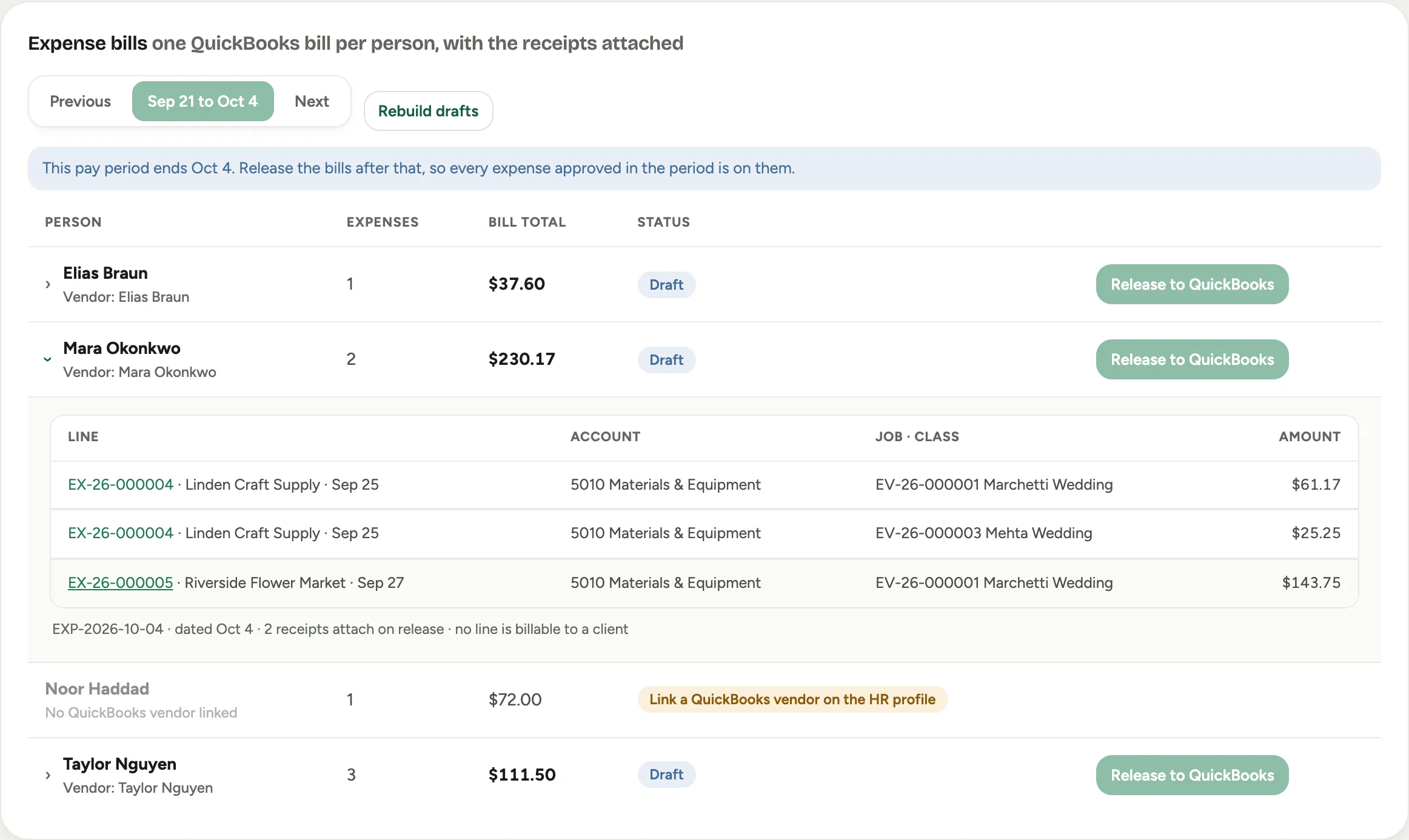
The Expense bills card, under the reimbursements card, shows one bill per person for the pay period, with the receipts attached. It exists so the cost reaches your books coded the way it was approved. Use Previous and Next to move between periods.
Each row is a person, with the number of expenses, the Bill total and a Status:
| Status | What it means |
|---|---|
| Draft | Built from the approved expenses and not sent. Drafts keep up as more are approved. |
| Queued | Released, and on its way to QuickBooks. |
| In QuickBooks | Sent. The row shows the bill’s number. |
| Not sent | It could not be sent. The reason is on the row, with Try again. |
Open a row to check it before anything is sent: each line shows the expense it came from, its Account, its job and class, and its amount, and the foot of the bill says how many receipts attach and that no line is billable to a client. If a draft looks out of date, Rebuild drafts builds every draft again from the latest approved expenses.
 Screenshot from a demo workspace; data illustrative.
A person with No QuickBooks vendor linked has no draft. Open their employee profile and choose their QuickBooks vendor; Florio does not create vendors. A subcontractor paid by vendor bill has a row too, marked Repaid by this bill, not by payroll.
Release a bill
Click Release to QuickBooks on a draft row.
- Release waits for the pay period to end. Until the day after the period’s last day, the buttons are off and the card says when the period ends. This is so every expense approved in the period is on the bill.
- A line that would be recorded wrongly stops the release. If a line charged to a job has no cost category, or a line has no account, Florio names the expense. Fix it on the expense, then release.
- Sending is off until your company turns it on. Out of the box, the drafts build and can be checked, and Release answers QuickBooks writing is switched off, so nothing was sent. An admin turns it on, after a rehearsal: see The QuickBooks switches.
Two cases look different on the card:
- A period that comes to less than zero, because a correcting entry outweighs the person’s expenses, is sent as a vendor credit, not a bill. The card says so under the status.
- A period that comes to exactly zero is sent as a bill for nothing, so that each line still reaches its account.
Once a bill has gone to QuickBooks, its expenses can no longer be re-opened. Fix a mistake with a correcting entry, which lands in the current pay period and on that period’s bill.
What Florio leaves to you
- Paying the bill. How the bill is cleared against the payroll that repaid the person is a bookkeeping step in QuickBooks. Agree on it with your accountant before you turn sending on.
- The same receipt entered by hand. If someone also keys a receipt into QuickBooks, it counts twice, and Florio has no way to know.
What we don’t publish
The exact file formats, the period math and the way bills are matched on a retry are intentionally not documented here.