Set up vendor mail
Vendor mail lets Florio read the order confirmations, shipping notices and invoices your vendors already send, and attach them to the right purchase order. It is off until an admin turns it on and says which mailboxes to read. Admin › Vendor mail.
Florio reads only mail from the vendors it knows and mail your groups relay, in the mailboxes you name, and never mail between people at your company.
Turn it on
Read vendor mail is the switch, and it stays off until you have named at least one mailbox below. Nothing is read while it is off.
Reading starts the moment you switch it on. It does not go back through your history, so anything that arrived before that day is never opened. If there is a backlog you care about, somebody still has to work it by hand.
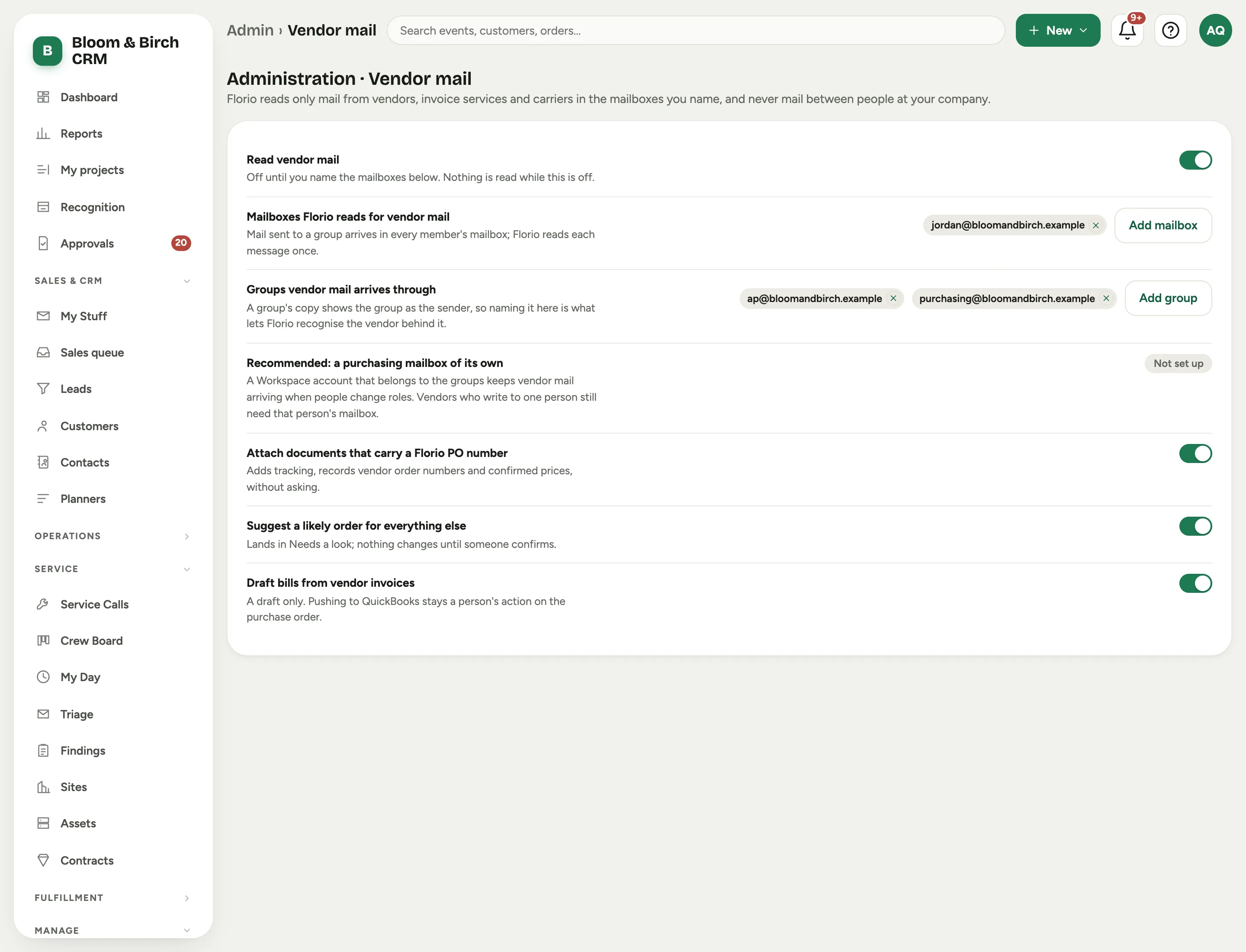 Screenshot from a demo workspace; data illustrative.
Name the mailboxes
Mailboxes Florio reads for vendor mail is the list. Add the people vendors actually write to: in most shops that is whoever places the orders, plus whoever handles the bills.
It is usually more people than you think. Vendors write to whoever gave them an address: the technician who called in a part, the project manager the rep knows, the person who set up the account years ago. A vendor email that lands only in a mailbox not on this list is never read, so before you settle the list, ask around who gets order confirmations and shipping notices.
Recommended: a purchasing mailbox of its own. A workspace account that belongs to the groups keeps vendor mail arriving when people change roles, so the reading does not quietly stop the day somebody moves on. Vendors who write to one person by name still need that person’s mailbox listed.
Mail sent to a group arrives in every member’s mailbox. Florio recognises the copies as the same message and reads it once.
Name the groups
Groups vendor mail arrives through means your ap@ and purchasing@ addresses, or whatever you
call them. A group rewrites the sender to itself, so the copy that arrives says the group sent it
and hides the vendor underneath. Naming the group here is what lets Florio recognise the vendor
behind it.
Which senders it reads
Florio reads two kinds of mail in those mailboxes: mail from the sending addresses of vendors it knows, and anything your groups relay.
A vendor it does not know yet is read only through a group. Florio searches your mailboxes for the sending addresses of vendors it knows. A new supplier that writes straight to one person is not found until Florio knows its address, and it learns addresses from mail your groups relay. Asking vendors to send to your purchasing group is the surest way to have their mail read from the first message.
It learns a new vendor from you. When somebody confirms a document that came through one of your groups from an address Florio did not know, against a purchase order, Florio learns that the address belongs to that order’s vendor and reads its mail from then on. It never learns your own company’s address or a personal email service such as Gmail, because it would then read everything sent from it.
Newsletters are filed, not read. Vendors send marketing from the same addresses as their orders. Mail that carries a mailing list’s unsubscribe mark, with no PDF attached and nothing in its subject that says order, shipment or invoice, goes straight to Set aside without being read. It is kept, and you can still open it. Mail your own groups relay is always read, because a group puts that mark on everything it passes along.
Your exclusions apply here too. A sender on the email capture Exclusions (never capture) list, by address or by domain, is skipped by vendor mail as well: nothing from them is stored or read. See Set up email capture.
Choose what it may do on its own
Three switches, from most to least certain:
- Attach documents that carry a Florio PO number. Adds tracking, records vendor order numbers and confirmed prices, without asking. This is the only signal Florio treats as certain, because it is your own number printed back at you.
- Suggest a likely order for everything else. A weaker match (a vendor order number already on an order, a tracking number already on one of your boxes) lands in Needs a look and nothing changes until somebody confirms it.
- Draft bills from vendor invoices. A draft only. Pushing to QuickBooks stays a person’s action on the purchase order.
The one thing to ask your purchasers
Type your Florio PO number into each vendor’s PO field, on every order.
Every vendor has that field, and every vendor prints back what you put in it. It is the only thing that lets a shipping notice attach itself to the right order without a person. Without it, the suggestions are good but somebody has to confirm each one. It costs nothing, needs no setup, and works from the first order somebody types it on.
The full number or just its digits both work: PO-058213 or 058213. The digits alone attach a
document only when it comes from that order’s vendor; from anyone else they make a suggestion.
See Let Florio read your vendor mail for what a purchaser sees.