Make an internal cost sheet for production
The proposal your client sees is deliberately clean: pretty pictures, prices, no cost. But the person building the event needs the opposite. The internal cost sheet is the same familiar document with the numbers turned on, so a designer can hand the production lead one page that shows exactly what each item costs to make and where the margin can slip.
Before you start
- You need to be able to see an event’s margin scorecard. If your role does not include the cost side of the business, the button does not appear, because this page shows costs and margin.
- Enter your costs on the proposal’s line items (materials and labor) so there is something to break down. Lines with no cost entered still show, just without a cost table.
Steps
- Open the event’s proposal and choose Internal PDF, under Document on the right. It opens in a new tab.
- It is also on the Preview page, next to Download PDF.
- Florio builds the sheet. Print it for the shop wall or share the file with your production lead.
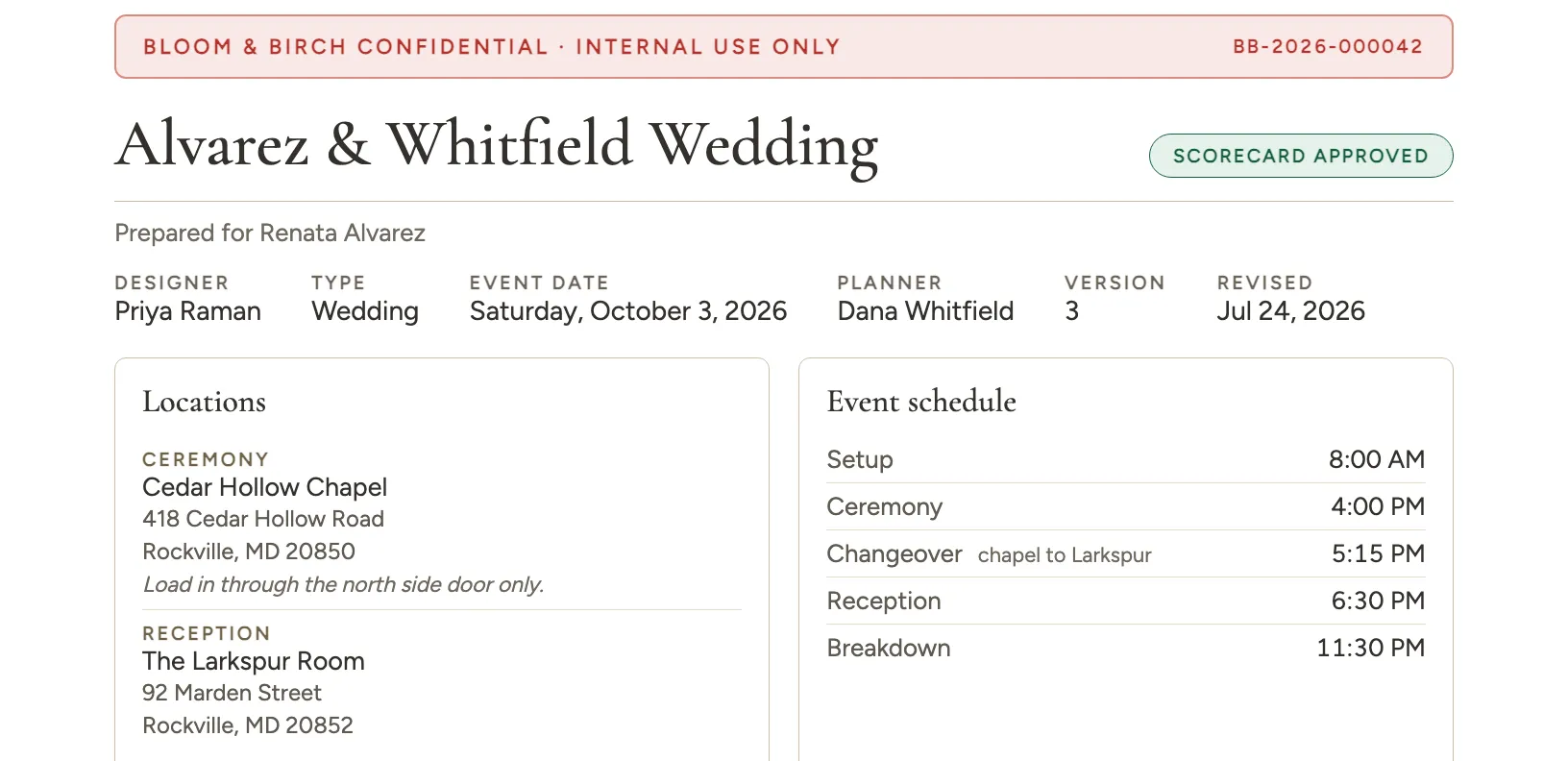 Screenshot from a demo workspace; data illustrative.
Where the event happens
The sheet lists every location on the event, each with its full street address and any note you have left on it, next to the day-of schedule. Someone loading a truck can read the address and the load-in time from the same page. Add or edit locations on the event itself, and they follow onto the sheet.
The client proposal is more discreet: its cover shows the venue name and city, never the street address. If the event has more than one location, a cover without photos lists them all, and a cover built around photos shows the first one so the line under the title stays short.
Room to write
Every line has a notes panel down the right side, whether or not it has costs, because the crew marks these up by hand. If you have already typed an internal note on the line, it sits at the top of that panel and the ruled space follows underneath.
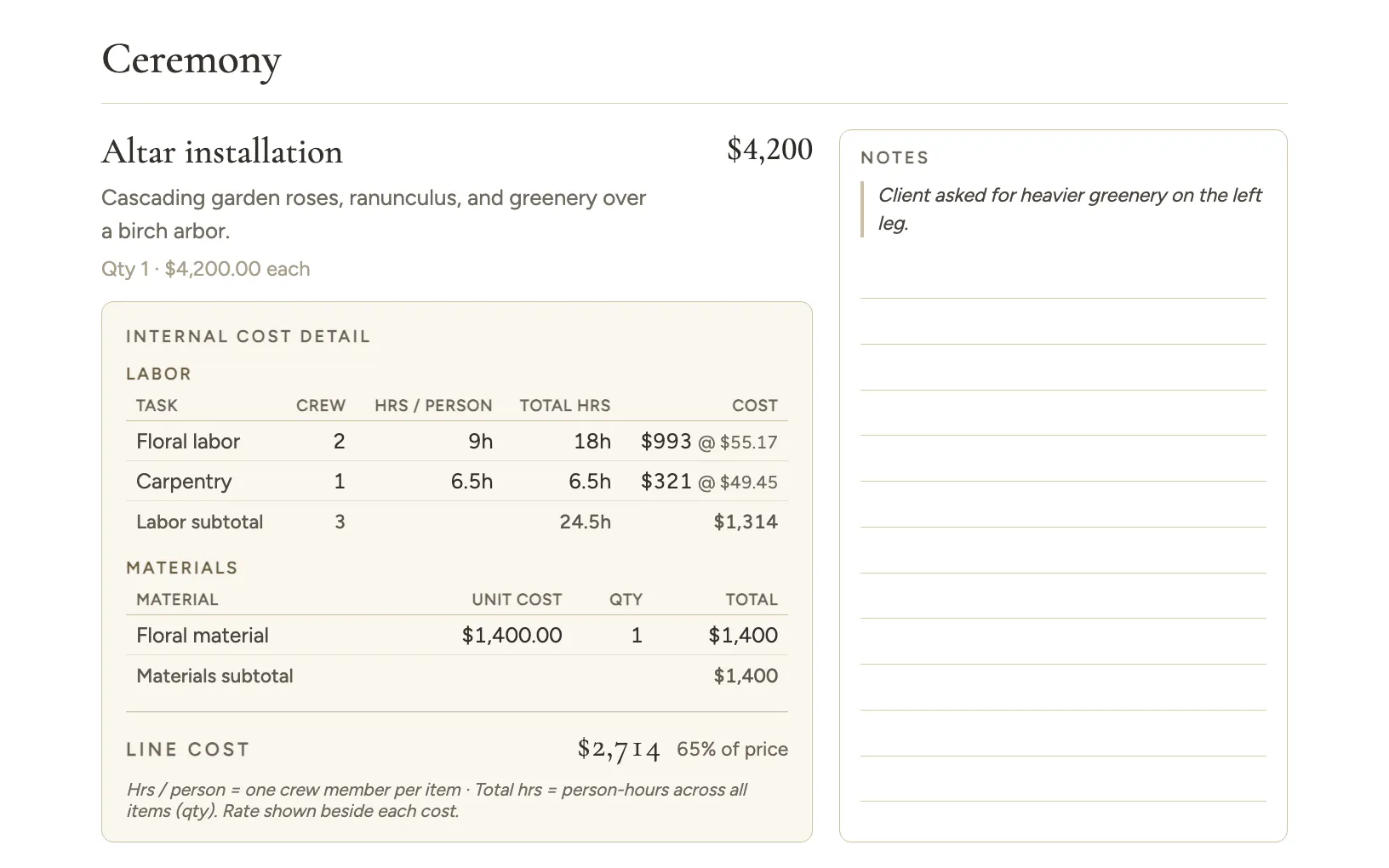 Screenshot from a demo workspace; data illustrative.
Good to know
- What is on it. A compact header (event, client, designer, date, version, and whether the scorecard is approved), the locations and the day-of schedule, the proposal’s scope of work, every line with its photo and price, and under each line a labor table (crew, hours per person, total hours, cost, with the hourly rate beside it) and a materials table (unit cost, quantity, total). It closes with the event scorecard: labor by type, material by type, gross profit, and commission.
- Each line shows what it costs against what it sells for. Next to the line cost you get that cost as a share of the line’s price, so an item running expensive stands out while you read. A line priced at zero shows the cost alone, since a share of nothing means nothing.
- It is marked Confidential. Every page carries an internal-use stamp. It is for your team, not the client.
- It prints clean without color. The cost tables are built to stay readable when you print with background colors turned off, so a black and white shop printer loses nothing and saves toner.
- Photos open full size here too. Line item photos are links, the same as on the client PDF. Tap one to open the uncropped image in the browser. The quantity and unit price line also prints darker now, so it survives a toner saving print like the rest of the sheet.
- Who can make one. Only people who can already see the scorecard, the same permission that guards cost and margin everywhere else.
- The scorecard follows the event. It reflects the event’s current approved numbers. If you are printing an older version or a different option than the one the numbers belong to, a short note on the scorecard says so, so the two halves never quietly disagree.
- Optional add-ons appear with their costs but stay out of the totals, the same as on the client proposal.