Take a service call
Most service calls open themselves, from an email to your service mailbox or from the public request form. This is how you open one by hand when a customer phones or walks in.
Before you start
Florio Service must be turned on for your workspace, and you need the permission to manage service calls. See Set up Florio Service.
Steps
- Go to Service Calls and choose New Service Call. You can also start one already attached to a place, from a site or an asset record, which fills in the customer for you.
- Give the call a short Title that says what is wrong, for example “Conference room display shows no signal”.
- Set the Customer. Leave it empty to send the call to Triage for someone to match later.
- Pick the Contact. This is the person Florio emails about every visit on this call, and once a customer is set it is required. The list holds that customer’s own people, so you cannot accidentally point a call at someone from another account.
- Check the Site. Florio fills it in for you: a customer with one site gets that site, and a customer with several gets the one marked as their Main site on the site’s page. The hint under the field says which rule applied. If the customer has several sites and none is main, pick where the technician is going; the call cannot be created without a site once a customer is set. A brand-new customer can add their first site from the picker. Add an Asset if a specific piece of equipment is involved. If the site is covered by a plan, set the Contract, and the call bills against the plan at no charge to the customer.
- Set the Priority and the Category. The category carries a default visit length, and the priority drives the first-response and resolution targets from your SLA matrix.
- Add the Caller name, Caller email, and Caller phone if the person who reported the problem is someone else, and write what they told you in Problem.
- Choose Create call.
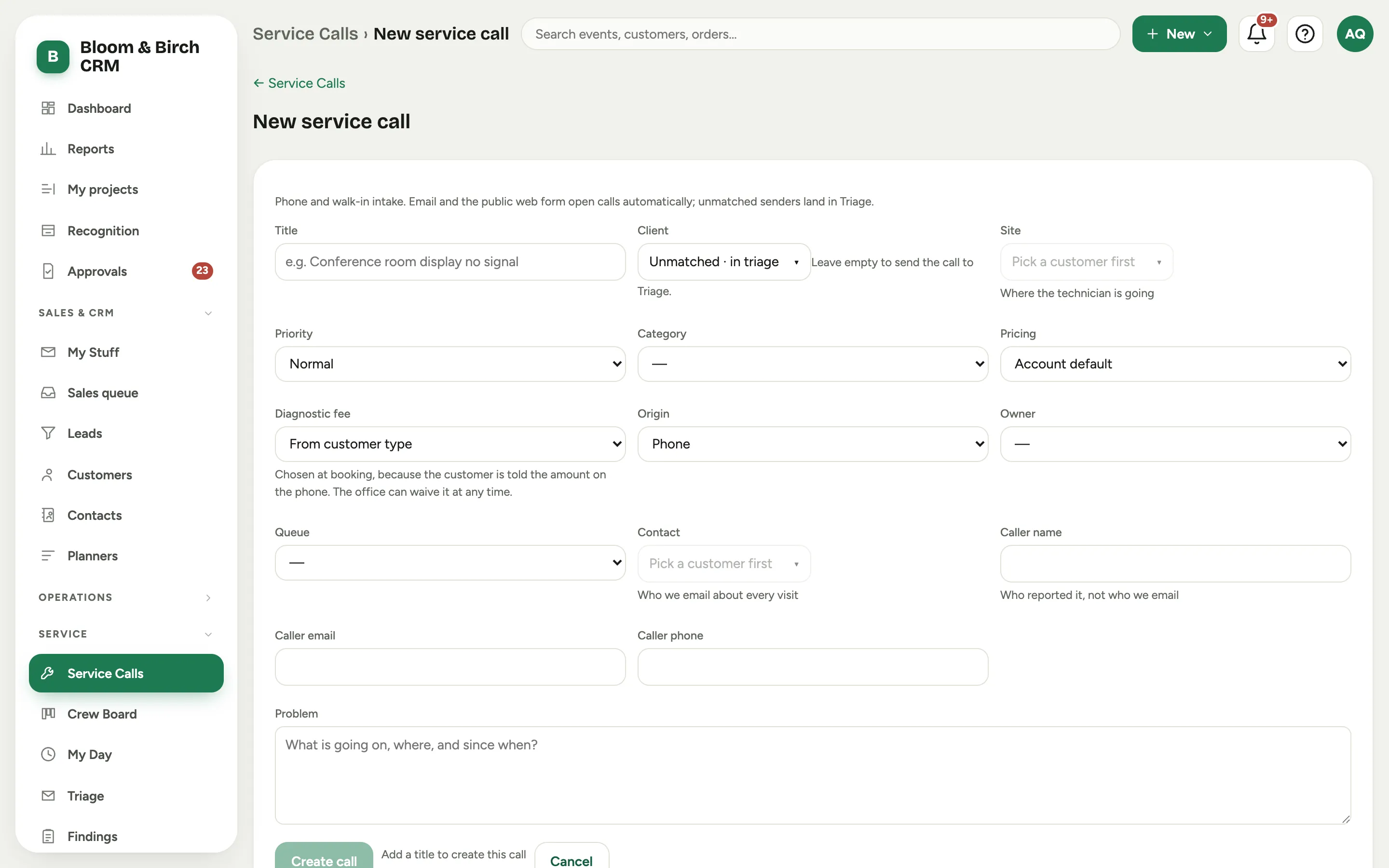 Screenshot from a demo workspace; data illustrative.
Contact and caller are different people
The Contact is who Florio writes to: the appointment email, the day-before reminder, and any notice that a visit moved or was called off all go to them. The Caller is simply who reported the problem, which is often a receptionist or whoever happened to be standing next to the broken thing. Keeping them apart means the person who has to be at the door gets the email, and the person who phoned it in does not get appointment mail they cannot act on.
A call that came in by email or through the request form may arrive with no contact, because the sender is not on the customer’s record yet. The call still opens, and its page carries a strip offering to pick a contact or add the caller to the customer. Until you do, appointment email falls back to the address the call came from.
Rename a call
A call opened from an email takes the email’s subject as its title, and a subject often names only the building, or nothing useful at all. Give it a title that says what the visit is for:
- Open the call. Its title sits in the header, next to the call number.
- Click the title (a pencil appears when you point at it), type the new one, and press Enter or click away. Esc leaves it as it was.
The call number never changes, and the rename is written to the call’s activity log. Write the title for the customer as well as your team: it names the visit in the appointment email, the notice that a visit moved, and the day-before reminder. Renaming a call does not change how its email finds it; replies still match on the conversation and on the subjects already on the call.
When it is not a service call
Some mail to your service address was never a service request: a customer writing about a project, a new sales inquiry, a booking confirmation or a receipt, a sales pitch. Close a call like that from the menu at the top right of its header with Not a service call, and say what it was:
-
About a project: choose the project. The emails move to it, later replies in the conversation go there, and the reply you owe moves with them.
-
A new sales inquiry: someone who is not a customer yet becomes a lead, or joins the lead they already have. An existing customer gets a new project instead, named from the call.
For teams who quote in D-Tools Cloud, that project is made in D-Tools. The dialog shows the same form as Create an opportunity: owner, expected close date, budget, type, contact and site, lead source, Credited to (filled in when a technician sent the email as a turnover) and scope notes. Click Review to see exactly what goes to D-Tools, then confirm. Florio makes the opportunity there, brings it back as a project with its D-Tools number, and only then closes the call onto it, so the call’s banner names both numbers. When the sender is not matched to a customer yet, the dialog first asks Who is asking?: pick a customer you already have (Florio suggests one when the sender’s email, domain or phone points at exactly one) or choose a lead. If D-Tools does not answer, nothing is closed: the call stays open and the try waits on its Opportunities card with Retry, which closes the call once it goes through.
-
Automated mail or a receipt: optionally save an Ignore at intake rule from the sender, and close the other open calls the rule matches in the same step.
-
Spam or marketing: optionally block the sender’s address. Blocking stops capturing any message that address is on, as sender or copied, in every mailbox, so use Automated mail for a vendor or anyone you do business with.
The call keeps its number and its history and moves to the Not service tab of the call list, out of the open list, the closed list and the service counts. No later reply in its conversation opens a new call or sends the customer an acknowledgement. A call with a visit, parts, time or a presented quote on it is service work, so it cannot be closed this way: cancel it from its status instead. To undo, choose Restore as a service call from the same menu.
Create an opportunity from a call
A technician on a visit often spots new work: a system that is due for an upgrade, a room the customer wants to add. Turn it into an opportunity from the call itself, so the sale stays tied to the call it came from and to the person who found it. For teams who quote in D-Tools Cloud, Florio makes the opportunity in D-Tools and brings it straight back as a project, already carrying its D-Tools number.
- Open the call and choose Create an opportunity from the menu at the top right of its header. The call needs a customer first.
- Give it an Opportunity name (the call’s title usually names the fault, not the sale) and check the rest: Owner (only people who can own an opportunity in D-Tools are listed), Expected close date, Budget, Type, Contact and Site (the call’s own unless you change them; use Add another contact for more than one), Lead source, and Credited to, the person who gets the credit for finding it (the technician on the last completed visit unless you change it).
- Write Scope notes for whoever builds the quote.
- Choose Review. It lists exactly what goes to D-Tools and what stays in Florio. Choose Create opportunity.
The call shows the new opportunity under Opportunities from this call, with its D-Tools number, owner, stage and value, and the project’s page shows From a service call with the scope notes and a Copy button. D-Tools keeps the scope of work on the quote and cannot take it from Florio, so paste the notes into the quote when you build it; the project reminds you until the quote has one.
A contact D-Tools does not have yet is kept in Florio and not sent: add them in D-Tools. Florio cannot delete an opportunity in D-Tools, so if one is made by mistake, mark it Lost there. If D-Tools cannot be reached, the try stays on the call with Retry, and Retry never makes a second opportunity.
When the work belongs to an opportunity that already exists, choose Link an existing opportunity instead: pick it from the customer’s open opportunities, or find another, and say who gets the credit. Nothing is sent to D-Tools.
How an email finds its call
Most replies carry something Florio recognises, and the call’s email feed says which it was, next
to each message: Matched by reply headers, Matched by call number (the [SC-n] tag Florio
adds to mail sent from a call), Same conversation, or Matched by vendor reference.
That last one covers the support desks your vendors run. Their emails carry a ticket token in the subject, and the first time one lands on a call Florio remembers it, so every later message from that vendor about the same ticket finds the call, whichever inbox it arrives in and even when the vendor starts a fresh thread. A message from a vendor or a colleague is added to the feed but never starts the customer’s response clock; only the customer’s own reply does that.
When nothing deterministic applies, Florio looks at the customer: a customer with one open call who writes to the service address lands on it, and a customer with several is matched on the subject. Those matches show as Matched by customer or Matched by subject with a check tint when the evidence was thin, so a glance tells you which ones to confirm.
If Florio still cannot choose between a customer’s open calls, an admin can let a model decide (Admin > Service > Email matching). The model sees only the customer’s open calls, picks one or none, and Florio attaches only when its confidence clears the level you set; those show as Matched by AI on the feed. Below that level, or with the switch off, Florio opens a new call marked Possibly the same as the calls it could not choose between, with a one-click merge, rather than guess.
Fix a wrong match
Matching is automatic; correcting it is yours, and every correction is written to the call’s activity log. The controls sit on the call’s Activity card, on the row with the feed filters, next to the record they correct.
- Merge into another call. When two calls turn out to be the same problem, open the duplicate and choose Merge into another call, even on a call with no customer yet. The dialog suggests the calls it is probably a duplicate of, with the reason, and has a search. Its emails, conversations, vendor references, notes and files move to the call you pick, and the duplicate is cancelled with a link to the survivor (the survivor shows Includes with the old number). The survivor takes what it was missing: the problem description (added under “From” and the old number when it already has one), the caller’s name, email and phone, and the contact; emails that were on no customer are filed under its customer; and a reply the duplicate still owed carries over unless you mark it Already answered. A call that already has a visit, punched time, parts or a presented quote is real work, not a duplicate, so it cannot be merged; close it and say why. The call page lists the calls this one is probably the same as, with the reason and Not the same, and the same merge; see Merge a duplicate.
- Detach into a new call. When a customer’s new problem landed on their existing call, use Detach into a new call on that email in the feed. The email and its conversation move to a fresh call for the same customer, with its own response clock, and nothing on the old call is cancelled.
- Attach an email. To file a customer’s email that Florio left on the customer only, choose Attach an email and pick it from their recent mail. An email already on another open call is not moved from here; detach it there or merge the calls.
- Vendor references. Open Vendor references on that same row to see the tokens Florio learned from a vendor’s support desk. Add one by hand so the vendor’s next message lands here, or remove one that is wrong. The count beside the heading is how many the call carries.
Photos and files on the call
The call has an Attachments card. Drag files straight onto it from your desktop, paste a screenshot with Cmd-V, or choose Add files. On a phone or tablet the button reads Add photos or files and offers your camera, which is how a technician standing in front of the equipment gets a picture onto the call.
- Photos, PDFs and documents up to 500 MB each. Several at once is fine; each shows its own progress, and one file that fails does not stop the rest.
- Photos and PDFs preview in place. Click a photo to enlarge it, or any file to open it.
- Video shows a still, its length and its size; click to play or download.
- Each file says where it came from: the person who added it, from email for something a customer sent, or the name of your previous system for a file that came across with your history.
- Files that arrive by email land on the call by themselves. The small images inside an email, such as the logos and icons in a signature, stay with the email and stay off the card, and a file that is quoted down a reply chain shows once. Open the email to see everything it carried.
- Adding or removing a file is recorded on the call’s activity log with your name.
Files that arrived with your history are kept: only an administrator can delete one. Files you add yourself you can remove.
Good to know
- A call with no visit yet is an Unscheduled open call: it shows in that stat and in the Crew Board’s Needs Scheduling rail until you add a visit. Put a technician on it in Schedule and dispatch a visit.
- The Service Calls list is one place for both help-desk tickets and field jobs. A ticket you answer without going on site is simply a call that never gets a visit.
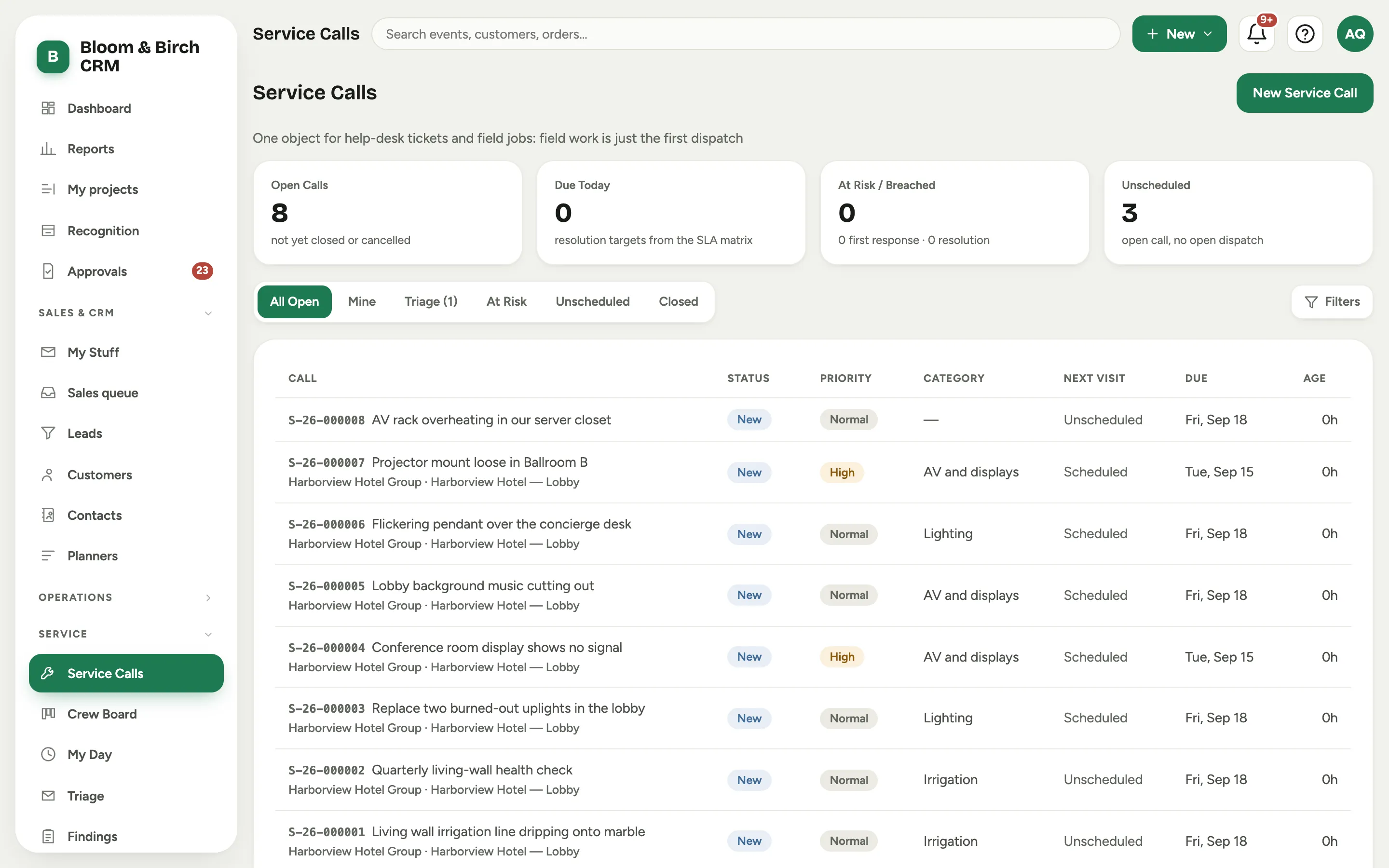 Screenshot from a demo workspace; data illustrative.